ExtraSubst Home 26.7 多语言版是一款小巧的虚拟磁盘工具,可将常用文件夹映射为虚拟驱动器,方便快速访问。支持创建、编辑和删除虚拟盘,无需分区,保持物理磁盘不变,提升文件管理效率。
原始标题:ExtraSubst Home 26.7 Multilingual
ExtraSubst – 旨在让您更轻松地访问计算机中常用文件夹的程序。 它还用于创建、编辑和删除计算机的虚拟驱动器。 Extra Subst 基于所选文件夹创建虚拟驱动器。 物理驱动器保持不变,不会划分为额外的分区。
File size: 2.9 MB
Extra Subst – program designed to make access to frequently used folders of your computer easier. It is also used to create, edit and remove virtual drives of your computer. Extra Subst creates virtual drives on the basis of selected folders. Physical drives remain unchanged and are not divided into additional partitions.
Features
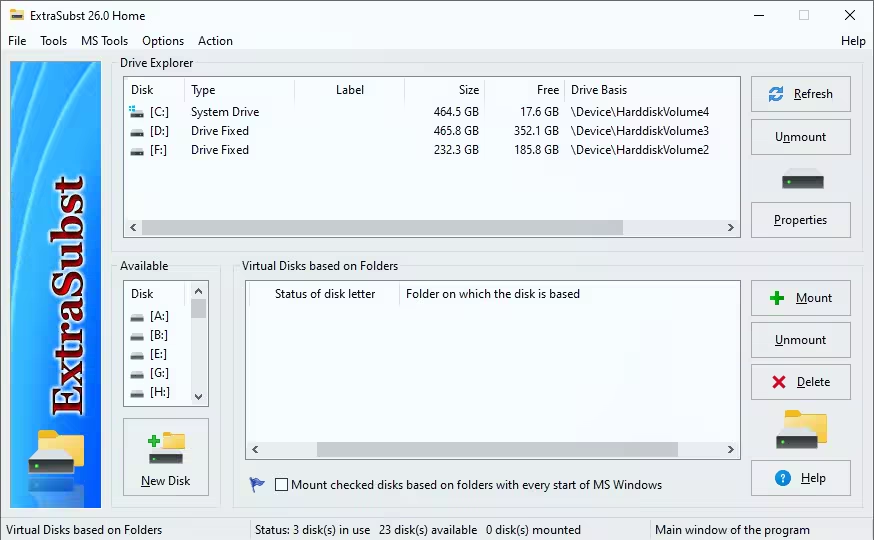
Program interface consists of three basic parts
1. “Drive Explorer” – shows all used drives of your computer with necessary information about them. When you double-click on selected drive, “Explorer” with selected drive will be opened. In this part of the program interface you can also remove selected virtual drives with the help of “Remove” button.
2. “Available Drives” – the list of available drives of your computer. This part of the program interface is used for creating virtual drive. When you select the disk and press the button “New” or double-click the selected drive a virtual drive is created in your system and the record about it is placed in the list “Start Up Virtual Drives”.
3. “Start Up Virtual Drives” – the list of records about created in the operation system virtual drives. In this part of the program interface you can adjust the list of drives initialized during start up of your computer.
官方网站:https://rg.to/file/80cca0b8c7356dc33cc48ab2c4435dc8/ExtraSubst_Home_26.7.rar.html
此处内容需要权限查看
会员免费查看