Diffchecker 7.2 Multilingual 是一款强大的差异对比工具,支持文本、代码、图片、PDF及文件夹对比,彩色高亮标注差异,离线操作确保数据安全,适合法律文档、敏感代码等场景。
原始标题:Diffchecker 7.2 Multilingual
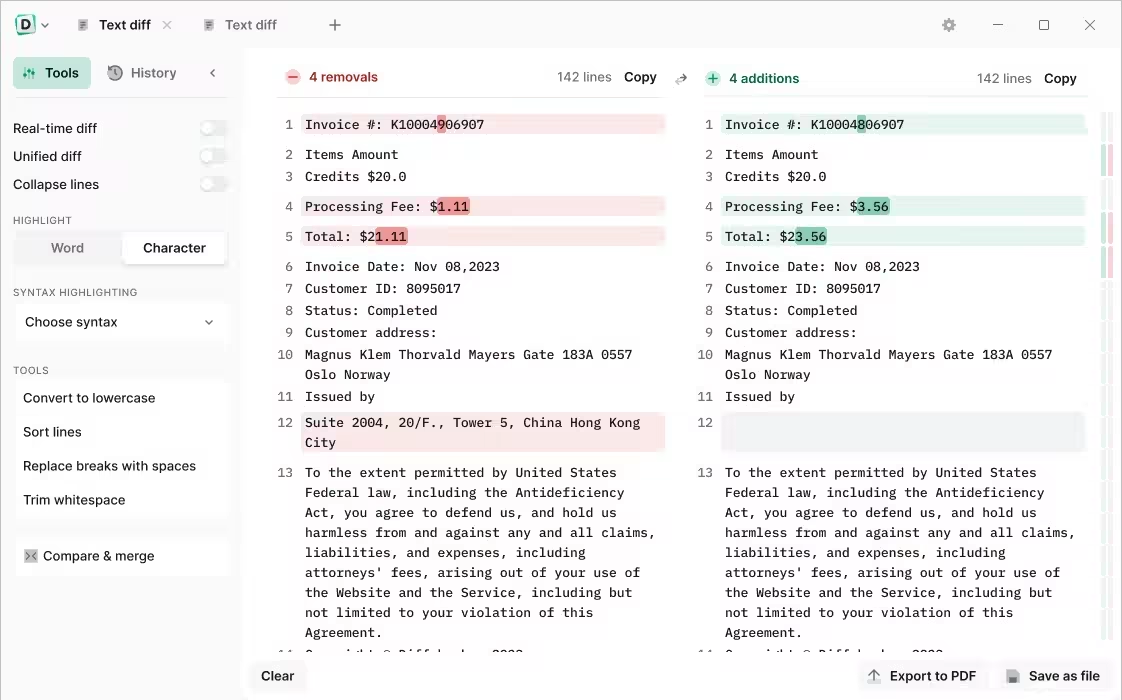
Diffchecker 是一款功能强大的差异对比工具,支持文本、代码、图片、PDF及文件夹的对比。它通过直观的彩色高亮标注(新增为绿、删除为红、修改为黄),帮助用户快速识别并合并文档或代码的修改差异,大幅提升核对效率。
File size: 143.4 MB
Discover the power of offline security. Safely compare text, images, and files offline — on Windows.
Protect your confidential documents
Using Diffchecker Desktop is like keeping your files in a safety deposit box — our enterprise-grade security ensures your data never leaves your computer.
How does it work?
Diffchecker Desktop operates exclusively on your computer, without any interaction with our web servers. This guarantees industry-leading functionality and faster speed, all packaged in a powerful interface designed for utmost security.
Whether you find yourself at JFK or Mount Everest, browse your files with confidence knowing that Diffchecker Desktop operates fully offline, keeping your client data safe on your machine.
Perfect for
Legal documents
Tax forms
Sensitive code
Encrypted files
Confidential data
Unsecured networks
Compare text with total precision
Instantly compare any text files, whether it’s code, legal documents, or your favorite sourdough recipes. Check differences by word or character and make real-time edits
Compare photos, images and graphics
Slide to compare images pixel by pixel or seamlessly fade and overlay two pictures for a clear result
Compare Word and PDF documents
Use our AI software to extract and compare content from two PDFs, or merge files to highlight graphic differences
Compare spreadsheets
Scan through each cell like an X-ray or display files side by side for a detailed overview of your data
Compare folders
Check folder contents and document details to organize your files or see what’s missing
Do more with Diffchecker Desktop
Your all-in-one comparison powerhouse, with over 30+ features for a faster, easier workflow.
Character-by-character comparison
When every detail matters, check your code, contracts or invoices down to each individual character
Syntax highlighting
Pick from more than 20+ languages, including Javascript, Markdown, Python, R, and C++
High-speed performance
Compare a thousand lines of code or even the most complex PDFs in no time
No ads
Eliminate distractions so you can focus on what really matters — your work
System Requirements: Windows 10, 11
此处内容需要权限查看
会员免费查看