VovSoft Compare Two Texts 1.5.0 是 Windows 轻量级文本比对工具,支持并排对照、高亮差异、忽略大小写与空格,适合校对、翻译、查重和代码对比。
原始标题:VovSoft Compare Two Texts 1.5.0
Vovsoft Compare Two Texts 是一款专为 Windows 设计的轻量级文本比较和分析软件。它可以帮助用户并排比对两段文本或文件,快速找出并高亮显示差异。
- 并排对比:支持左右分栏或并行对照两份文本内容,直观展示修改前后的变化。
- 高亮标记:自动标记出文本中被添加、删除或修改的部分。
- 灵活选项:支持设置是否忽略大小写(Text Case)以及空白字符(Whitespaces),以满足不同的比对精度需求。
- 适用场景:适用于校对文档、检查翻译准确性、寻找抄袭/重复内容、审查代码或比对配置文件等。
- 操作简便:界面简洁,无需复杂的配置,适合程序员、学生、译者及日常办公人员使用。
File size: 5.1 MB
Vovsoft Compare Two Texts is a straightforward Windows tool that places two pieces of text side-by-side and automatically highlights the differences. It eliminates manual proofreading, making it perfect for checking code, document revisions, and content analysis.
Simplicity is a core focus; you can easily drag and drop files directly from Windows Explorer right into the interface.
If you prefer, you can also use the built-in “Load” buttons or simply paste text directly from your clipboard.
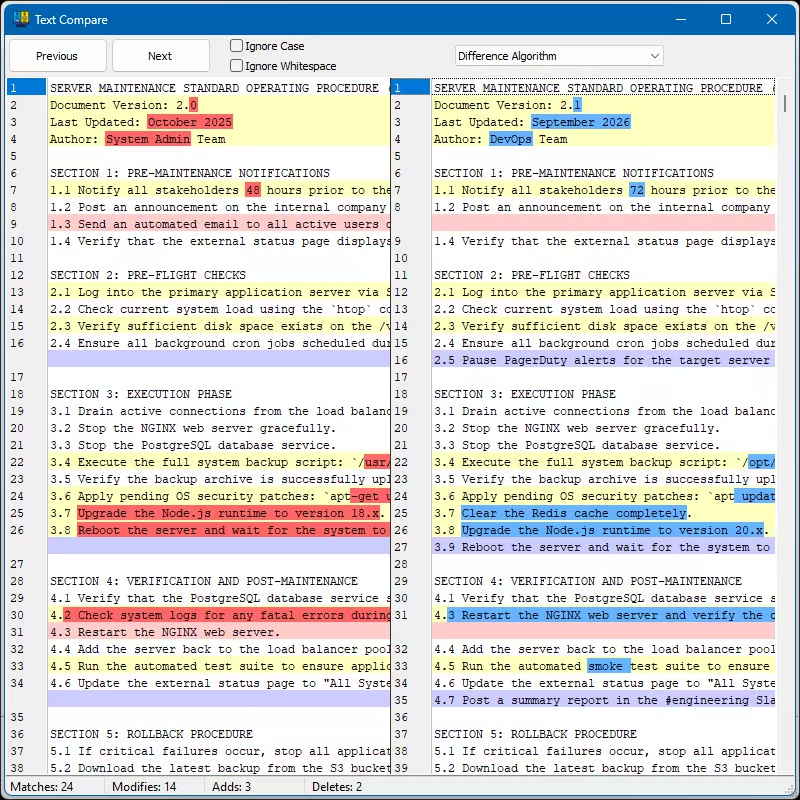
The software accurately detects and highlights changes between your files.
Discrepancies like additions, deletions, and modifications are clearly color-coded on a line-by-line basis.
You can quickly jump between these specific differences using the convenient “Previous” and “Next” buttons.
Customization options allow you to tailor the comparison process to your exact needs.
With a single click, you can instruct the program to ignore whitespaces or ignore uppercase and lowercase differences.
You can also select different comparison algorithms from a dropdown menu for more complex tasks.
The program supports standard plain text files (.txt) as well as Microsoft Word documents (.doc and .docx).
A handy status bar at the bottom summarizes the total number of matches, modifications, additions, and deletions to give you a quick, at-a-glance overview of the file changes.
System Requirements: Windows 11, Windows 10, Windows 8/8.1, Windows 7, Windows Vista (64-bit)
百度网盘下载: