
Gammadyne String-O-Matic 是一款强大的多文件文本搜索与替换软件,支持ASCII、Unicode和UTF-8文件,适用于程序员和网页开发者,可批量重命名、预览替换结果,大幅提升工作效率。
原始标题:Gammadyne String-O-Matic 36.0
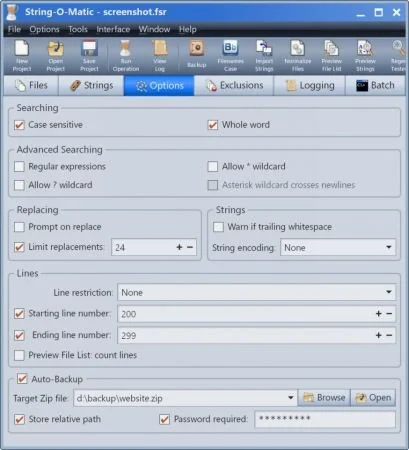
Gammadyne String-O-Matic 是一款用于在多个文件中搜索和替换文本字符串的软件。它特别适用于需要处理大量源文件的大型项目,但也适用于任何类型的文件,包括HTML 文件。
File Size: 30.8 MB
String-O-Matic performs search and replace operations with multiple strings in multiple files. It was designed specifically for computer programmers working on large projects with many source code files, however any type of file can be used, including HTML. String-O-Matic will save you so much time and tedium, it pays for itself on the first use.
Features
Works on 8-bit ASCII, 16-bit Unicode, and UTF-8 files.
Not only can search and replace operations be performed on the contents of one or more files, but on their filenames as well. This is very useful for the automated mass renaming of files.
Regular expressions are supported. Or, simple question mark and asterisk “wildcards” can be used.
The search-only option allows you to preview the changes before they are made.
Optional “Prompt on replace” mode supported.
Permits case-sensitive or case-insensitive searches. This includes all unicode letters, not just the latin letters in ASCII.
The “Whole Word” option can be used to ignore matches that occur inside a word. For example, “amp” would be ignored if found in “example”.
The “Line Restriction” option can restrict matches to entire lines, or the beginning or end of a line.
The source files can be backed up into a compressed Zip file. This can optionally be done automatically before a search and replace operation starts. Might just save your job.
A MS-DOS command batch can be executed before and after the operation, and before and after a file is changed. This is useful for automating certain chores.
The file list supports the asterisk and question mark wildcards so that you can easily specify a set of files. Also, there is an option to recursively look in subfolders.
The line numbers on which the operation is performed can be limited to a certain range.
A detailed operation log is generated.
Great care is taken when making changes to a file. The old file is renamed to a temporary file for safe keeping. The replacement is then written and verified. If no errors occur, the temporary backup file is deleted. Otherwise, the backup file is restored and the error is reported. These steps help ensure that data never gets lost, even in the event of a drive error.
Includes a tool for normalizing newlines. This fixes files with bare carriage returns, bare line-feeds, and backwards newlines. It can also trim whitespace from the end of lines.
Includes a tool for bulk filename case conversions.
All settings can be stored in a project file for later re-use.
A thorough Help File describes all features in detail. A Tutorial and Wizard can assist with project configuration.
System Requirements: Windows 7, 8, 10, 11
此处内容需要权限查看
会员免费查看


