学习在Blender中创建模块化地中海资产,导入UE5进行高效组装与渲染。本课程涵盖资产规范、纹理密度控制、Lumen光照和后期处理技术,适合所有级别学员。
原始标题:Blender to Unreal Engine 5: Stylized Greek Environment
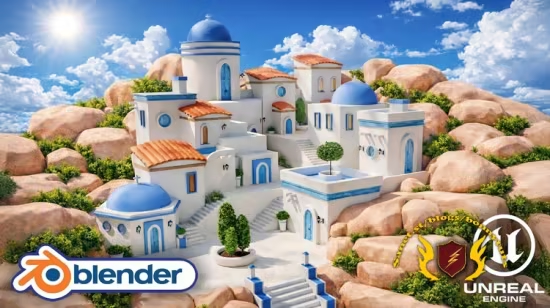
本课程旨在传授一套工业级风格化环境制作流水线,指导学员在 Blender 中构建符合轴心、纹理密度和命名规范的模块化地中海资产,并导入 UE5 进行高效组装。通过该流程,学员可实现资产的自由组合与复用,并利用 Lumen 实时光照和后期处理完成电影级视频渲染。
Published 7/2026
Created by 3D Tudor
MP4 | Video: h264, 1920×1080 | Audio: AAC, 44.1 KHz, 2 Ch
Level: All Levels | Genre: eLearning | Language: English | Duration: 60 Lectures ( 12h 1m ) | Size: 13.8 GB
Build a modular stylized village in Blender, export with GLB, then assemble, light and present it in Unreal Engine 5
What you’ll learn
⚡ Plan a stylized environment with references, human scale, blockouts, silhouette checks, and camera composition
⚡ Build a reusable modular Greek island architecture kit with buildings, roofs, stairs, doors, windows, and props
⚡ Create consistent UVs and seamless materials with controlled texel density, grain direction, and tile variation
⚡ Set clean origins, pivots, names, scales, normals, and attachment points so assets snap together correctly
⚡ Export a clean GLB asset library and preserve separate meshes and useful pivots in Unreal Engine 5
⚡ Assemble a layered village with a clear focal point, readable skyline, rock foundation, and supporting foliage
⚡ Improve simple materials with sky, sun, fog, exposure, ambient occlusion, tangents, and colour grading
⚡ Present the finished environment with a cinematic 16:9 camera, simple animation, and final video render
Description
Stop Building Assets That Only Work Once
Have you ever spent hours modelling a building, only to discover that its pivots are useless, the UVs stretch, the pieces refuse to snap, or the Unreal Engine import turns the whole thing into a clean-up project? The missing skill is not another random modelling trick. It is learning how to design the kit, the hand-off, and the final environment as one connected production system.
In this course, you will create a bright, stylized Mediterranean village from the ground up. You will begin with reference planning, human scale, blockouts, and silhouette. Then you will build a reusable family of white-plaster buildings, blue domes and trims, terracotta roofs, stairs, walls, doors, windows, lanterns, pots, rocks, and architectural details in Blender.
Once the kit is ready, you will clean it for export, transfer it through GLB, validate it inside Unreal Engine 5, and rebuild the village from separate, editable building blocks. The final stages cover ambient occlusion, tangents, skybox and sun setup, fog, exposure, rock foundations, custom shrubs, colour grading, CineCamera framing, camera animation, and final video output.
The result is more than a single finished scene. You will leave with a repeatable modular environment-art workflow you can apply to future game worlds, stylized architecture, portfolio pieces, and real-time projects.
What You Will Build
Your finished project is a compact Greek-island-inspired village with a clear blue-domed church landmark, stepped white architecture, terracotta roof accents, exterior stairways, courtyards, warm rounded rocks, green foliage, a bright clouded sky, and a cinematic 16:9 presentation.
✨ A complete reusable modular architecture kit in Blender
✨ A clean, tested GLB asset library with practical pivots and separate meshes
✨ A layered Unreal Engine 5 village assembled from editable building blocks
✨ A real-time lighting and material-readability setup for clean stylized surfaces
✨ A polished hero image and an optional short CineCamera animation
The Complete Blender-to-Unreal Engine 5 Workflow
✨Resource Pack and Project Setup: Organise the supplied materials, references, reusable assets, Geometry Nodes tools, scale guide, skybox, and sun resources, then choose the Asset Browser, Append, or copy-and-paste workflow that fits your project.
✨Modular Building Foundations and Roof Systems: Create scalable building bodies, floor rings, rounded roof forms, procedural terracotta tiles, lattice-deformed roof variants, and clean preview materials.
✨Doors, Windows, and Architectural Props: Build reusable door and window families, shutters, supports, crosses, pillars, pots, a chimney, a lantern, and other details while keeping UV direction and material separation under control.
✨Stairs, Walls, Rocks, and Kit Variations: Generate modular stairs, create platforms and curved walls, build seamless corners, sculpt and optimise rocks, and produce additional variations without rebuilding the asset family.
✨Export, Import, Sky, and Lighting Setup: Clean names, transforms, normals, origins, and Collections, export through GLB, preserve pivots, fix imported materials, and establish the custom skybox, sun, Skylight, fog, and manual exposure.
✨Village Assembly and Material Readability: Use the kit as actual building blocks, create stepped massing and focal hierarchy, refine architectural detail, and strengthen contact and form with ambient occlusion and tangent corrections.
✨Rock Foundations and Foliage: Build the rocky perimeter through overlap and clustering, then repurpose vegetation into interior and exterior shrubs that support the camera and silhouette.
✨Final Colour and Cinematic Presentation: Complete colour grading, cloud-shadow variation, CineCamera framing, a simple two-keyframe move, and the final real-time render.
What You Will Learn
✨ Plan a stylized environment with references, human scale, blockouts, silhouette checks, and camera composition
✨ Build compatible modular architecture with Bevel, Weighted Normal, Solidify, Mirror, Boolean, Array, Lattice, Decimate, curves, and Geometry Nodes
✨ Reuse modifier stacks, roof systems, doors, windows, props, materials, rocks, and vegetation to create variations faster
✨ Create clean UVs with Smart UV Project, manual seams, Follow Active Quads, Minimum Stretch, texel-density control, and roof-tile randomisation
✨ Set useful origins, pivots, names, dimensions, normals, and attachment points so every asset behaves like a practical building block
✨ Export through glTF 2.0 and GLB with UVs, normals, tangents, modifiers, and reusable settings
✨ Import into Unreal Engine 5 while preserving pivots, keeping meshes separate, and correcting common normal-map and tangent problems
✨ Assemble a layered village with a clear church focal point, stepped roof heights, controlled negative space, and a strong thumbnail silhouette
✨ Use ambient occlusion, sky, sun, Skylight, fog, exposure, post-process controls, and colour grading to make simple materials feel rich
✨ Create believable rock foundations and custom shrub clusters from reusable vegetation
✨ Frame, animate, and render a polished real-time environment presentation
Six Reasons This Workflow Is Different
✨Complete Resource Pack: Follow the course with prepared materials, references, example assets, Geometry Nodes setups, vegetation, a 4K skybox, sun plane resources, and finished project files.
✨Build Modular Environments Faster: Use shared primitives, reusable modifier stacks, asset repurposing, arrays, Geometry Nodes, and lattice cages instead of modelling every structure independently.
✨Simple Materials, Strong Results: Learn how controlled UVs, bevel highlights, ambient occlusion, contact shadows, lighting, fog, and colour grading can make a restrained material set feel polished.
✨A Complete Blender-to-Unreal Workflow: Follow one connected route from initial reference and modelling through GLB export, Unreal Engine import, assembly, foliage, lighting, and final presentation.
✨Build Assets That Snap Together: Treat scale, origins, pivots, names, dimensions, and attachment points as part of the creative workflow so the kit is enjoyable to use.
✨Create Custom Foliage in Unreal Engine 5: Repurpose existing vegetation into shrubs and bushes, then vary rotation, scale, height, overlap, and placement to avoid obvious repetition.
What Is Included
✨ 60 structured lessons covering the full Blender-to-Unreal Engine 5 production pipeline
✨ A main Blender resource-pack file with organised materials, example assets, and Geometry Nodes setups
✨ Reference sheets for visual direction, props, prefabs, buildings, and the final environment
✨ Prepared PBR materials for Blender, Eevee, Cycles, and GLB export
✨ A human scale reference for checking architecture, stairs, platforms, and props
✨ An adjustable Geometry Nodes stairs setup and a Blender-focused hedge setup
✨ Vegetation resources for custom Unreal Engine foliage variations
✨ A finished Blender-side reference scene
✨ A 4K skybox plus sun plane and sun texture resources
✨ Checkpoint questions, mini assignments, transfer tests, and a structured final environment project
A Project-Based Course That Makes You Use the Workflow
Watching a clean demo is easy. Building a kit that still works after UVs, export, import, lighting, and final composition is where the learning becomes real.
Throughout the course, focused checkpoints and mini assignments ask you to test the parts that usually cause trouble: human scale, modular fit, texel density, wood-grain direction, pivots, normals, GLB settings, tangent quality, ambient occlusion, rock overlap, foliage placement, and camera readability. The final project brings those decisions together in a smaller original Greek-island-inspired scene.
Who this course is for
⭐ Blender artists ready to go beyond isolated props who want a clear system for turning individual objects into a complete, readable environment
⭐ Stylized environment artists and worldbuilders who want strong shapes, clean colour separation, reusable architecture, and a polished real-time presentation
⭐ Unreal Engine learners who want to understand why pivots, normals, tangents, UVs, material settings, and mesh separation matter in the Blender hand-off
⭐ Indie game developers and technical artists who need practical, editable modular building blocks that reduce repeated work and speed up iteration in Unreal Engine
⭐ Portfolio builders who want one project covering modelling, UVs, modular design, engine assembly, lighting, foliage, composition, and camera presentation
⭐ Pipeline nerds and kitbash tinkerers who prefer a kit with useful pivots, predictable names, clean Collections, and sensible attachment points
此处内容需要权限查看
会员免费查看