
AutomationX Studio是一款Windows平台的全离线自动化引擎,无需订阅或联网,通过可视化流程拼装和内置AI助手Aximo,即可轻松构建并导出独立EXE机器人,实现重复性工作自动化。
原始标题:AutomationX Studio 1.0.0
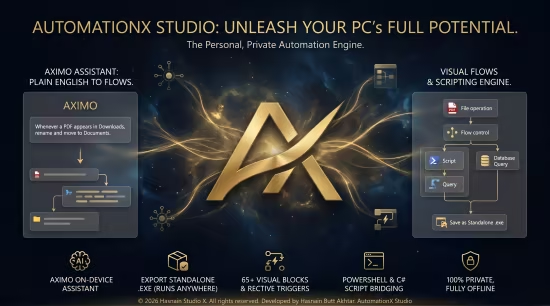
AutomationX Studio 是一款面向 Windows 平台的全离线自动化引擎与工作室,旨在帮助用户在不需要订阅、账户或联网的情况下处理电脑上的重复性工作。它可以从 Microsoft Store 微软应用商店 获取。
核心功能
可视化流程拼装:通过拖拽和拼接可视化区块(如窗口和进程控制、文件操作、桌面自动化、局域网网络、条件判断、循环、并行分支及错误处理等)来构建自动化工作流。
内置本地 AI 助手 (Aximo):用户可以用简单的日常英语对内置助手 Aximo 描述需求,让它自动在后台生成对应的流程。
导出独立运行程序:当自动化流程测试成功后,支持将其导出为单个独立的 .exe 机器人文件,无需安装任何额外环境即可在其他 Windows 电脑上运行。
隐私与本地优先:完全在本地离线运行,所有数据、日志和脚本都不经过云端,也不离开用户的设备。
Languages: English
File Size: 246.26 MB
An offline automation studio for Windows. Build flows, define variables and run repeatable tasks on your own machine, with every flow and value stored locally.
Key Features
– Visual automation flow builder
– Variables and reusable steps
– Flows and data stay on-device
– No cloud sync, no accounts
AutomationX Studio isn’t just a task runner. It’s a full offline automation engine built for anyone who wants their PC to handle repetitive work – without a subscription, an account, or a single byte leaving the machine.
Snap together visual blocks – window and process control, file operations, desktop automation, LAN networking, conditions, loops, parallel branches, error handling, scripts, and a local database – into a flow, press Run, and watch every step play out in a live log. Or just tell Aximo, the built‑in assistant, what you want in plain words and watch it build the flow for you. When it works, export it as a single standalone .exe that runs on any Windows PC with nothing installed. Everything runs locally, so your automations keep working with no internet, no cloud, and no strings………….
System Requirements
– OS: Windows 10 version 19041.0 or higher
– DirectX: Version 11 (Minimum), DirectX 12 API, Hardware Feature Level 12 (Recommended)
– Memory: 8 GB (Minimum), 16 GB (Recommended)
– Processor: Quad Core Processor X64 (Minimum), Octa Core Processor X64 Or Better (Recommended)
此处内容需要权限查看
会员免费查看


