VovSoft Window Resizer 5.0是一款窗口尺寸调整工具,可将任意软件窗口设为精确像素大小,支持修改标题、测试响应式、快速关闭窗口,适合网页设计与截图。
原始标题:VovSoft Window Resizer 5.0
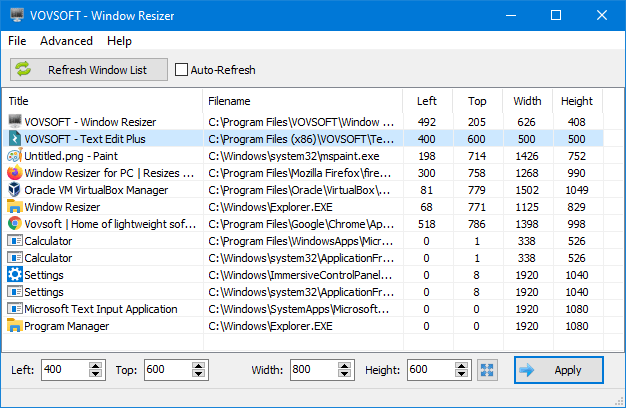
VovSoft Window Resizer 是一款可以把电脑上的任何窗口调整到精确、预定义尺寸的小工具。
- 精确调整大小:快速将浏览器、文档或其它软件窗口设置为固定的长宽像素。
- 修改窗口标题:支持更改窗口的标题文字。
- 测试响应式:方便开发人员检查网页或软件在不同分辨率下的适配情况。
- 关闭窗口:可以直接通过工具快速关闭选中的窗口。
File size: 3.1 MB
Vovsoft Window Resizer is a utility that allows you to resize any window to an exact, predefined size. This is extremely useful when designing web pages, as it allows you to see how the page will look when viewed at a smaller size. The utility is also handy when compiling screenshots for documentation, using Window Resizer allows you to easily maintain the same window size across screen grabs.
If you are looking for a program resizer software, this utility will resize them for you using window title of any running application.
How to resize any window to a specific size
When you open the program, it shows the list of all apps running on your Windows PC. You can select any app and specify the size at the bottom section and click on the “Apply” button.
Save current application positions for later use
Additionally, you can save the current positions (width, height, left, top) as CSV file and “Load and Apply” later. All the running programs will be resized depending on the values in the CSV file.
This program can utilize Desktop Window Manager (DWM). It can get and set exact window size values by taking non-client areas into account.
System Requirements: Windows 11, Windows 10, Windows 8/8.1, Windows 7, Windows Vista (64-bit)
此处内容需要权限查看
会员免费查看