本教程以YOLO26为核心,带你从CVAT、Roboflow数据标注到模型微调,通过五个企业级项目掌握实例分割、物体追踪与MediaPipe姿态估计,并借助MCP协议接入大模型,打造能看能听的视觉AI智能体。
原始标题:Computer Vision Bootcamp: Real-World YOLO26 Projects
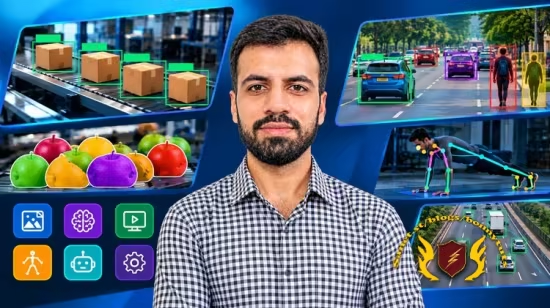
这是一个在 2026年10月 环境下推出的 YOLO26 计算机视觉与 MCP 智能体(Agent)实战新手教程。
本课程是一门紧跟2026年最新AI趋势的 YOLO26 计算机视觉与 MCP(模型上下文协议)智能体实战新手教程。课程完全以项目为导向,旨在教你如何将原始图像和视频一步步转化为能够解决实际问题的实时视觉应用。你将全面掌握 CVAT、Roboflow 和 Ultralytics 三大主流工具,不仅能熟练运用边界框、多边形和关键点进行高精度手动标注,还能解锁AI自动标注(Auto-labeling)技术来大幅缩减数据准备时间。标注完成后,你将学习如何在 Roboflow、Ultralytics 平台以及 Google Colab(利用免费云端 GPU) 等多种环境下微调定制化的 YOLO26 模型,从而建立起从“数据采集、智能标注到模型训练”的完整工业级闭环工作流。
在应用落地与前沿拓展阶段,课程通过五个企业级实战项目深入教学。你将利用 YOLO26 的实例分割与物体追踪技术,构建诸如“三车道传送带包裹实时计数”和“流水线橙子追踪”等工业级视觉系统;同时利用 MediaPipe 姿态估计技术,通过计算骨骼关键点角度开发一款智能俯卧撑计数器。尤为创新的是,课程最后引入了前沿的 MCP 协议(Model Context Protocol),教你将训练好的 YOLO26 目标检测和分割工具作为外部技能无缝接入 OpenAI 大语言模型。最终,你将亲手打造出一个能听、能看、并能自主调用本地视觉工具进行深度图像分析的智能 AI 助手(Agent),实现传统计算机视觉与现代生成式 AI 的深度融合。
Published 10/2026
Created by Muhammad Moin
MP4 | Video: h264, 1920×1080 | Audio: AAC, 44.1 KHz, 2 Ch
Level: All Levels | Genre: eLearning | Language: English | Duration: 21 Lectures ( 5h 20m ) | Size: 6.6 GB
Annotate data, train custom YOLO26 models, count objects in real time, track poses, and connect vision to AI with MCP
What you’ll learn
⚡ Annotate images and videos in CVAT using bounding boxes, polygons and keypoints
⚡ Export annotated datasets from CVAT in COCO format for model training
⚡ Annotate images and create custom datasets in Roboflow
⚡ Use Roboflow’s auto-labeling to speed up dataset creation
⚡ Train custom YOLO26 models directly in Roboflow
⚡ Fine-tune YOLO26 models on custom datasets using Google Colab
⚡ Build a custom object detection model, such as African wildlife detection
⚡ Train YOLO26 instance segmentation models, such as pothole detection
⚡ Train and manage models using the Ultralytics Platform
⚡ Build a real-time orange counting application on a conveyor belt using segmentation and tracking
⚡ Build a package counting application for a three-lane conveyor belt
⚡ Segment, track and count objects moving through multiple lanes in real time
⚡ Detect body landmarks in video using MediaPipe pose estimation
⚡ Build a push-up counter by calculating elbow angles
⚡ Explain what the Model Context Protocol (MCP) is and why it is useful
⚡ Build an AI app that connects an OpenAI model to YOLO26 detection and segmentation tools using MCP
Requirements
❗ Basic Python knowledge is a plus, but no programming experience is required
❗ A computer with internet access (we use free tools like Google Colab)
❗ No prior experience with YOLO or computer vision is needed
Description
Want to build real computer vision projects, not just watch theory? In this course, you’ll learn how to take an idea from raw images all the way to a working application using YOLO26, one of the latest computer vision models.
You’ll create your own datasets, annotate them, train custom models, and turn those models into practical, real-time applications that solve real problems. Every lecture is hands-on, and you’ll follow along step by step.
Learn how to annotate your data in three different tools
Good models start with good data, so we spend real time on annotation. You’ll learn how to annotate images in CVAT, Roboflow and the Ultralytics Platform.
In CVAT, you’ll create bounding boxes for object detection, polygons for segmentation datasets, and keypoints for pose tasks. You’ll also learn how to annotate videos, and how to export your datasets in COCO format.
In Roboflow and the Ultralytics Platform, you’ll learn how to upload and organize your images and annotate them directly in the browser. Because you’ll see all three tools, you can choose the one that fits each project best.
Save hours with auto-labeling
Labeling hundreds of images by hand is slow. You’ll learn how to auto-label your images in both Roboflow and the Ultralytics Platform, so the tool does most of the work for you and you only review and correct the results. This is one of the fastest ways to build a custom dataset.
Train your own YOLO26 models
Once your dataset is ready, you’ll train YOLO26 models on your custom data in several ways: directly in Roboflow, on the Ultralytics Platform, and in Google Colab using a free GPU. You’ll see how each workflow works, so you can pick the right one for your own projects.
Build real-world projects
Throughout the course, you’ll apply everything to practical projects
✨African wildlife detection: auto-label a custom dataset and train an object detection model to recognize animals
✨Pothole segmentation: train an instance segmentation model that finds the exact shape of potholes, using Roboflow, Google Colab and the Ultralytics Platform
✨Orange counting on a conveyor belt: use YOLO26 instance segmentation and object tracking to count oranges in real time
✨Package counting on a three-lane conveyor belt: auto-label and train a package segmentation model, then build a real-time application that detects, tracks and counts packages in each lane
✨Push-up counter with pose estimation: use MediaPipe to detect body landmarks in video, calculate elbow angles, and count push-ups automatically
Connect computer vision to AI with MCP
In the final section, you’ll learn about the Model Context Protocol (MCP), a modern standard that lets AI models use external tools. You’ll build a simple AI app where an OpenAI model is connected to YOLO26 detection and segmentation tools. You can chat with it, ask it to analyze your images, and watch it pick and run the right tool on its own. You’ll also learn how to keep your API key safe using a .env file.
What you will be able to do after this course
By the end, you’ll know how to create your own datasets in CVAT, Roboflow and the Ultralytics Platform, auto-label images to save time, train models on your custom data, and turn them into real-time counting and tracking applications of your own. You’ll also be able to connect your vision models to an AI assistant.
Who this course is for
⭐ Beginners who want to learn computer vision by building projects
⭐ Python developers interested in AI and YOLO
⭐ Students and engineers who want practical, real-world examples
此处内容需要权限查看
会员免费查看