本课程零基础融合AI,教你用ChatGPT、Claude和VS Code攻克Power Query清洗、Excel公式与Power BI的DAX建模,快速实现自动化报表与高交互动态看板,低门槛转型数据分析专家。
原始标题:Power BI & Excel with AI: ChatGPT, Claude & Dashboards
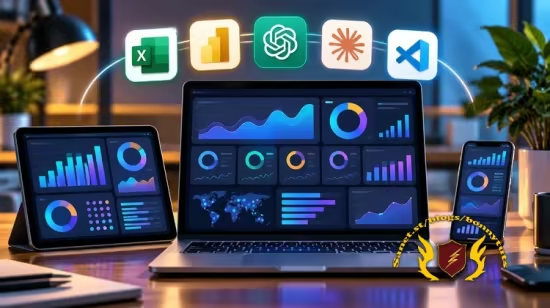
本课程是一门零基础、注重实战且全面融合AI的现代数据分析课。它颠覆了传统耗时的学习模式,核心亮点在于教会学员将ChatGPT、Claude和VS Code作为数字分身与虚拟助手,彻底攻克Power Query清洗数据、Excel高级公式编写以及Power BI中高难度的DAX建模与指标计算等核心痛点。即使学员毫无编程与数据背景,也能通过精准的AI提示词工程,迅速掌握从原始杂乱数据到企业级、高交互跨平台动态看板(Dashboard)的全流程。课程不仅能帮助学员数倍提升日常报表自动化与逻辑排错的效率,更聚焦于如何借助AI将死板的数据图表转化为驱动商业决策的高价值洞察,助力学员低门槛、高起点地平稳转型为能用AI赋能的高效数据分析专家。
Published 10/2026
Created by Ismaila Mumuni Omeiza
MP4 | Video: h264, 1920×1080 | Audio: AAC, 44.1 KHz, 2 Ch
Level: All Levels | Genre: eLearning | Language: English | Duration: 68 Lectures ( 4h 27m ) | Size: 2.7 GB
Master Data Analytics, DAX, Power Query, VS Code, AI Automation & Interactive Dashboard Projects
What you’ll learn
⚡ Build professional Excel and Power BI dashboards using AI tools like ChatGPT and Claude, even with little or no coding experience.
⚡ Use AI to clean, transform, analyze, and visualize data in Excel and Power BI with Power Query, formulas, and DAX.
⚡ Automate Excel and Power BI tasks using AI prompts to generate formulas, DAX measures, reports, and business insights.
⚡ Create real-world, interactive business dashboards from raw datasets using AI, and turn data into actionable decisions.
Description
Become a Data Analyst and Master Modern Data Analytics with Artificial Intelligence
Learn Microsoft Power BI, Microsoft Excel, ChatGPT, Claude AI, and VS Code to transform raw data into powerful dashboards, automate complex tasks, and generate actionable business insights.
Are you looking to become a professional data analyst, improve your Excel and Power BI skills, or discover how Artificial Intelligence is transforming data analytics?
This comprehensive, hands-on course takes you from beginner to advanced level, teaching you both traditional data analytics techniques and modern AI-powered workflows.
You will learn how to clean, transform, analyze, and visualize data using Microsoft Excel and Power BI. Beyond traditional analytics, you will discover how to use ChatGPT, Claude AI, and Visual Studio Code to simplify complex calculations, automate repetitive tasks, write advanced formulas, generate DAX measures, and accelerate your analytical workflow.
What You Will Learn
1. Microsoft Excel: Beginner to Advanced
✨ Master essential Excel functions and formulas.
✨ Clean, organize, and transform raw datasets.
✨ Use PivotTables, PivotCharts, and advanced Excel features.
✨ Create interactive and professional Excel dashboards.
✨ Apply AI tools to generate formulas and automate Excel tasks.
2. Microsoft Power BI: Beginner to Advanced
✨ Import and connect data from multiple sources.
✨ Clean and transform data using Power Query.
✨ Build effective data models and relationships.
✨ Write DAX measures and calculated columns.
✨ Create interactive reports and professional business dashboards.
✨ Learn data storytelling and dashboard design best practices.
3. Artificial Intelligence for Data Analytics
✨ Use ChatGPT and Claude AI as intelligent analytical assistants.
✨ Generate and troubleshoot Excel formulas, Power Query M code, and DAX.
✨ Perform AI-assisted data cleaning and exploratory analysis.
✨ Analyze large datasets and generate meaningful insights.
✨ Use AI to explain analytical results and communicate business recommendations.
4. VS Code, Claude AI & Modern Analytics Workflows
✨ Understand how to use VS Code for AI-assisted analytics.
✨ Explore Claude-powered coding workflows.
✨ Learn how AI tools can assist with complex data analysis.
✨ Build more efficient reporting and automation workflows.
✨ Discover modern techniques for combining coding, AI, and business intelligence.
Practical Projects
Throughout this course, you will apply your knowledge through practical exercises and real-world business scenarios, including sales analysis, performance reporting, and interactive dashboard development.
You will gain experience working with datasets, solving analytical problems, identifying business trends, and presenting your findings professionally.
Who Is This Course For?
✨ Complete beginners interested in starting a career in data analytics.
✨ Excel users who want to develop advanced analytical skills.
✨ Power BI users who want to improve dashboard design and DAX.
✨ Data analysts interested in integrating AI into their daily workflows.
✨ Business owners and professionals who want to make data-driven decisions.
✨ Students, freelancers, and aspiring business intelligence professionals.
Why Enroll in This Course?
Data analytics is evolving rapidly, and professionals who understand both traditional analytical tools and Artificial Intelligence have a valuable advantage.
Rather than relying entirely on AI-generated answers, this course helps you develop the analytical foundation needed to understand, validate, and improve AI-assisted results.
By the end of this course, you will be able to confidently work with Excel and Power BI, create professional dashboards, analyze business data, and use AI tools to work faster and more efficiently.
Start learning today and take your data analytics skills to the next level!
Who this course is for
⭐ Beginners who want to learn Excel, Power BI, and AI-powered data analysis without coding experience.
⭐ Data analysts who want to use ChatGPT and Claude to automate tasks, build dashboards, and improve productivity.
⭐ Excel and Power BI users who want to create professional reports, visualizations, and dashboards faster with AI.
⭐ Business owners, managers, and professionals who want to analyze data and make better business decisions using AI.
⭐ Students, freelancers, and career changers who want to develop practical AI, Excel, and Power BI skills for the workplace.
此处内容需要权限查看
会员免费查看