本教程讲解Rhino建模、UE5渲染与MADRIX灯光控制的跨软件联动工作流,涵盖洗墙灯建模、FBX导出、材质与轴心优化、镜头遮罩制作以及Art-Net协议下RGB像素动画实时传输,助你实现逼真的建筑灯光数字预演。
原始标题:Rhino to Unreal Engine 5: Wallwasher DMX with MADRIX
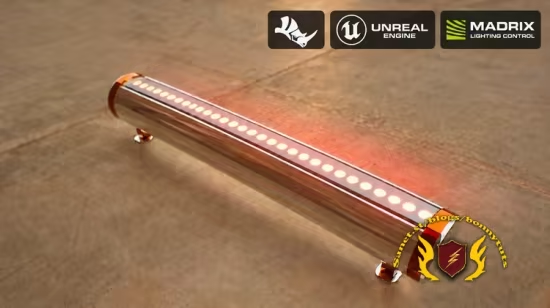
本课程是一门聚焦于建筑与舞台灯光数字化预演(Pre-visualization)的中级实战指南,核心在于打通 Rhino(三维建模)、Unreal Engine 5(实时渲染)与 MADRIX(专业灯光控台) 的跨软件联动工作流。学员将跟随讲师将一个洗墙灯(Wallwasher)设计从 Rhino 概念建模开始,导入 UE5 进行材质轴心优化与镜头遮罩制作,并最终通过 Art-Net 协议网络将 MADRIX 产生的动态 RGB 像素动画(如 Plasma、Noise 等特效)实时传输至 UE5 虚拟场景中,实现高度逼真的数字灯光秀演示。
Published 10/2026
Created by Volkan Ata
MP4 | Video: h264, 1920×1080 | Audio: AAC, 44.1 KHz, 2 Ch
Level: Intermediate | Genre: eLearning | Language: English | Duration: 20 Lectures ( 1h 12m ) | Size: 1.1 GB
Model a wallwasher in Rhino, build UE5 lighting, and animate RGB pixels with MADRIX and Art-Net.
What you’ll learn
⚡ Model and organize a wallwasher in Rhino using a supplied reference image.
⚡ Export FBX assets to Unreal Engine 5, assign materials, and refine component pivots and scene lighting.
⚡ Configure an RGB matrix fixture, patch DMX channels, and connect Unreal Engine 5 to MADRIX through Art-Net.
⚡ Create lens masks in Photoshop and refine an emissive lens material in the Unreal Material Editor.
⚡ Map fixture groups in MADRIX, compare animated effects, and build a complete wallwasher lighting scene.
Description
This course contains the use of artificial intelligence.
Course scope and expectations: This is a project-based workflow and design-development demonstration, not a complete Rhino or Unreal Engine training course. It does not teach either application from the beginning or explain every command, feature, or setting. Instead, it follows a specific wallwasher project through selected stages in Rhino, Unreal Engine 5, and MADRIX, showing how the design idea develops into a visual lighting presentation. Basic familiarity with Rhino and Unreal Engine is expected. Some operations continue inside an existing Unreal project and may move quickly. Review the curriculum and preview lesson to confirm that this workflow matches what you want to learn.
Artificial intelligence is used for the English narration and certain visual assets. The software demonstrations show the instructor’s project workflow; the focus is on design decisions, handoffs between tools, and the finished lighting concept.
In this project-based course, you will follow a wallwasher lighting project from its 3D model to an animated lighting presentation. The workflow connects Rhino modeling, Unreal visualization, and MADRIX lighting control.
The project begins in Rhino with a supplied reference image. You will see the wallwasher body, end caps, circular details, upper strip, and support feet modeled, organized in layers, and prepared with materials for export.
Next, the model is exported and FBX assets are brought into Unreal Engine 5. The demonstrations cover assigning materials, adjusting component pivots, refining the model, preparing scene lighting, and building a DMX-responsive wallwasher fixture.
The project then connects Unreal Engine to MADRIX through Art-Net. You will see how RGB matrix data, universes, channels, and pixel mapping are set up and checked. Color and animated effects are tested in the Unreal viewport to show how lighting data appears on the product.
In the final section, lens masks are created in Photoshop and refined in the Unreal Material Editor. Wallwasher groups are arranged along textured walls and extended into a room layout. MADRIX effects such as Color Scroll, Clouds, Plasma, and Noise are compared while the lens appearance, fixture alignment, light direction, and wall coverage are reviewed from close and wide views.
This course is intended for 3D artists, product visualizers, and lighting designers who already know the basics of Rhino and Unreal Engine and want to understand this particular cross-application workflow. Required software licenses are not included. The project focuses on visual modeling and lighting presentation; electrical design, physical hardware commissioning, and manufacturing specifications are outside its scope.
Who this course is for
⭐ Rhino users, product designers, and 3D artists who want to present a lighting product in Unreal Engine 5 with animated DMX effects.
⭐ Lighting designers and visualizers with basic Unreal Engine knowledge who want to connect a wallwasher scene to MADRIX and test pixel-based effects.
此处内容需要权限查看
会员免费查看