WiFi诊断神器WhyFi for Mac
WhyFi 1.4.2是macOS专属Wi-Fi网络分析工具,驻留菜单栏实时监测信号、路由延迟与互联网质量。内置雷达功能可找最佳位置,结合AI分层诊断,助你快速定位并解决网络问题,优化无线体验。
WhyFi 是一款专为 macOS 打造的 Wi-Fi 网络分析与排查工具,旨在帮助用户快速诊断网络问题并优化无线连接体验。在日常使用中,Wi-Fi 连接不稳定、速度波动或信号干扰等问题较为常见,而 WhyFi 通过直观的数据分析与可视化展示,让用户能够清晰了解当前网络状态。无论是普通用户还是对网络有更高要求的进阶用户,都可以借助 WhyFi 更高效地定位问题并改善网络表现,是一款实用的网络辅助工具。
File Size: 4.9 MB
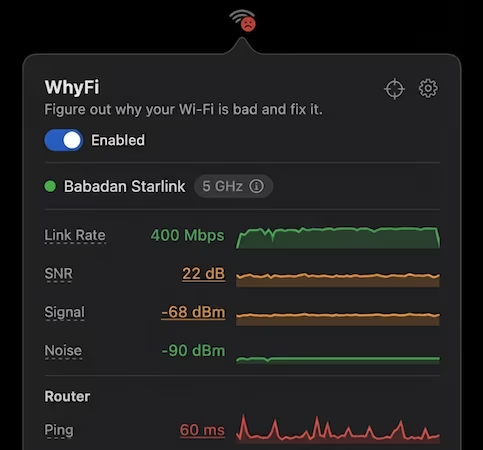
WhyFi lives in your macOS menu bar and keeps an eye on your Wi-Fi. It measures signal, router latency, internet quality, and DNS. Find out what’s actually wrong when things are slow and learn how to fix it.
WhyFi Radar finds you the best spot
A real-time signal monitor that updates 4 times per second. Walk around with your laptop and it tells you where the signal is strongest. Shows a 0–100 score and yells “keep going” or “go back” at you so you don’t have to guess.
Also shows nearby networks and their signal strengths, so you can see what’s crowding your airspace.
Figure out the problem and get help from AI
WhyFi checks your connection in layers: Wi-Fi signal (Mac to router), router (LAN latency), and internet (WAN latency). When something’s slow, you can see exactly which part is the problem.
Bad signal? Move closer. Router latency high? Restart it. Internet latency high? That’s your ISP. Not much you can do except complain.
You can also export a diagnostic report and paste it into ChatGPT or Claude for help.
此处内容需要权限查看
会员免费查看