Black NotePad 3.0.0 是一款免费轻量的 Windows 文本编辑器,支持深色主题、多标签页和多窗口编辑,可作为系统记事本的强大替代工具。
原始标题:Black NotePad 3.0.0 Multilingual
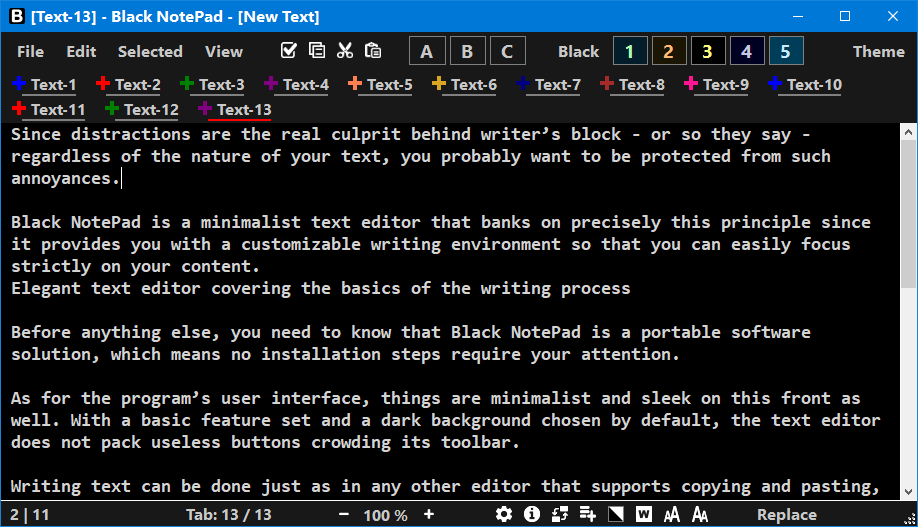
Black NotePad 是一款专为 Windows 平台设计的免费轻量化文本编辑器,旨在作为系统自带记事本(Notepad)的升级替代工具。它以舒适的视觉体验为核心,原生提供深色系主题,非常适合长时间的文本记录与简易代码编辑。
File size: 2 MB
Black NotePad is a plain text editor program. It carries out similar tasks to Microsoft Notepad while significantly supplementing and exceeding its functions. An essential function is the option to easily switch between display modes.
The menu system of Black NotePad makes it easy and clear to use. It can also operate in simplified mode if you disable the display of “Selected” and/or “Others” menus.
Black NotePad enables you to display and edit multiple text files at the same time within a window with the help of tabs. The software also has a multi-windowed mode. Tabs are still available in this mode, but the system tray icon isn’t.
Tabs are very important so the software provides support for them in several ways. Switching between tabs can be done in different ways. Tabs can be sorted manually and by name. After closing a given tab, you can restore it.
The software keeps a history of the text within the given tab. The current content is added here after each save. Different versions of the text can be restored this way. Attention! You can only restore the history and the tab within a single session.
The software keeps track of last opened and saved files, and provides easy access to them. You can also manage favorites.
Black NotePad has a Multilingual User Interface. You can find out more here. A list of the properties of Black NotePad is available on this page.
System Requirements: Windows 10 and Windows 11
此处内容需要权限查看
会员免费查看