本课程覆盖AI与AE核心技能,从关键帧、动效设计到3D空间、粒子特效,助你打造商业信息图表与卡通动画,轻松对接高端项目。
原始标题:From Design to Animation | Adobe Illustrator & After Effects
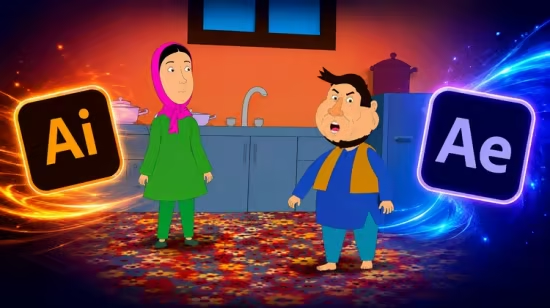
本课程是一套从零基础到职业实战的信息图表与卡通动作设计全阶指南。课程重点围绕 After Effects 核心动效展开,带你深度攻克关键帧曲线、动力学排版及品牌 Logo 动画,并跨越至 3D 空间摄像机、粒子特效(如 Trapcode)与影视级绿幕合成的高阶领域。通过融入表达式自动化流和主流 3D 插件(如 Element 3D),课程旨在帮助你打破传统二维限制,高效创作出兼具商业叙事力与视觉冲击力的社交短视频、企业宣传片和扁平化商业信息图表,最终通过一连串对标国际一线的实战项目,打磨出能够直接对接客户与雇主的高含金量作品集。
Published 8/2026
MP4 | Video: h264, 1920×1080 | Audio: AAC, 44.1 KHz, 2 Ch
Language: English | Duration: 2h 21m | Size: 1.95 GB
Create Infographics Cartoon Animation
What you’ll learn
Core Animation Skills — master keyframes, easing, and timing to create smooth, professional motion.
Motion Graphics Design — build text reveals, logo animations, and explainer videos that captivate audiences.
Visual Effects Techniques — apply tracking, compositing, and green screen magic for cinematic results.
3D Space & Camera Work — explore lights, cameras, and layers to add depth and realism.
Expressions & Automation — simplify complex animations with dynamic, code-driven controls.
Social Media Content Creation — design intros, transitions, and short-form animations for YouTube, TikTok, and Instagram.
Workflow Optimization — learn shortcuts, templates, and project organization to save time and boost creativity.
Portfolio Projects — complete real-world assignments to showcase your skills to clients and employers.
Foundations of Animation — keyframes, easing, timing, and the principles of smooth motion.
Text & Typography Animation — dynamic titles, kinetic typography, and professional lower thirds.
Logo & Branding Motion — create polished logo reveals and brand animations for clients.
Explainer Video Techniques — design engaging infographics and animated storytelling for businesses.
Cinematic Visual Effects — tracking, rotoscoping, compositing, and green screen workflows.
3D Layers & Camera Tools — add depth, perspective, and realism with lights and cameras.
Particle Systems & Special Effects — fire, smoke, rain, and abstract motion designs.
Transitions & Scene Building — craft seamless cuts, wipes, and creative scene changes.
Advanced Compositing — blending multiple elements into one cohesive, cinematic shot.
Color Grading & Visual Style — enhance mood and storytelling with color correction.
Creative Confidence — the ability to turn ideas into professional animations that stand out.
Essential Plugins Overview: Get familiar with industry favorites like Element 3D, Trapcode Particular, and Optical Flares.
Real-World Projects: Apply plugins in hands-on exercises to design motion graphics for ads, films, and social media.
Installation & Management Tips: Step-by-step guidance on installing, updating, and managing plugins without software issues.
Description
Bring your creative ideas to life with2D Animation using Adobe Illustrator and Adobe After Effects. In this practical, project-based course, you’ll learn how to transform static illustrations into engaging, professional animations from start to finish.
You’ll begin by learning how to prepare and organize artwork inAdobe Illustrator, creating clean, animation-ready characters, objects, icons, and graphic elements. Then, you’ll take your designs intoAdobe After Effects and learn how to animate them using keyframes, layers, shape animation, parenting, masking, motion paths, and other essential animation techniques.
Throughout the course, you’ll work with real-world animation workflows and learn how to create smooth movement, expressive character actions, animated typography, transitions, visual effects, and polished motion graphics. You’ll also discover how to control timing, spacing, easing, and motion to make your animations feel more natural and professional.
This course is designed to take you from thebasic principles of 2D animation to creating complete animated projects. By the end, you’ll have the skills and workflow needed to create animations for YouTube videos, social media, advertisements, explainer videos, presentations, promotional content, and creative projects.
What You’ll Learn
– Create animation-ready artwork in Adobe Illustrator
– Understand the fundamentals of 2D animation
– Import and organize Illustrator files in After Effects
– Animate characters, objects, icons, and illustrations
– Work with keyframes and animation properties
– Use parenting and layer relationships effectively
– Create smooth and natural motion
– Apply easing and control animation timing
– Animate paths, shapes, and graphic elements
– Create character and object movement
– Use masks, mattes, and basic visual effects
– Create animated text and typography
– Build professional transitions and motion graphics
– Combine Illustrator artwork with After Effects animation
– Organize projects using a professional workflow
– Render and export animations for different platforms
Who Is This Course For?
This course is ideal forgraphic designers, illustrators, beginners, content creators, motion designers, and anyone who wants to turn their static designs into professional 2D animations.
No advanced animation experience is required. You’ll learn step by step, with practical projects that help you build your skills while creating real animated content.
By the end of the course, you won’t just know how to animate—you’ll understand how to think like a 2D motion designer and turn your illustrations into engaging visual stories.
Who this course is for
Beginners who want to start their journey in motion graphics and visual effects.
Content creators on YouTube, TikTok, and Instagram looking to make eye-catching intros, transitions, and animations.
Graphic designers eager to expand their skillset into dynamic video and animation.
Video editors who want to add professional-level effects and motion graphics to their projects.
Students & freelancers aiming to build a portfolio and attract clients in the creative industry.
Marketing professionals who need engaging visual content for ads, presentations, and campaigns.
No Coding or python
此处内容需要权限查看
会员免费查看