
Abyssmedia i-Sound Recorder 7.9.6.1 是一款无需启用立体声混音即可直录声卡输出的 Windows 音频软件,支持 MP3、FLAC 等格式,高保真采样,集成定时、声控、降噪功能,适合录制流媒体和网络广播。
原始标题:Abyssmedia i-Sound Recorder for Windows 7.9.6.1
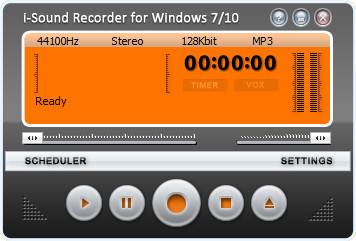
Abyssmedia i-Sound Recorder 是一款专为 Windows 系统设计的先进音频录音软件。它无需开启繁琐的“立体声混合(Stereo Mix)”功能,就能直接从声卡输出端捕获高质量的系统内部声音、网络广播、流媒体音乐或麦克风语音。
核心功能:
- 免立体声混合直录:直接通过默认扬声器或输出设备录音,省去配置音效驱动的麻烦。
- 多格式实时压缩:支持将音频实时保存为 MP3、OGG、WMA、AAC、OPUS 等常见格式,或 FLAC、APE、WAV 等无损格式。
- 高保真音质:最高支持 24-bit/96kHz 甚至更高的无损采样率录制。
- 智能录音工具:内置定时任务规划器、声控录音(VOR)、静音跳过以及按时间自动分割音轨等功能。
- 实时音频过滤:提供降噪和自动增益控制,优化现场录音效果。
i-Sound is a next generation sound recorder for Windows. Newest version unleashes the power of Windows 10 and ready to record streaming audio out-of-box. i-Sound includes all the features of its predecessor, but main feature is an ability to record audio from output device directly without using “Stereo Mix” input. Yes, it’s true! “Stereo Mix” is no longer required. You do not need to spend time searching right audio driver. You do not need enable “hidden” or “disabled” audio devices via Control Panel.
Direct Audio Recording
After installation i-Sound will use your default playback device (Speakers) for recording. You will get the digital copy of all sound going through the speakers with perfect quality.
Real time audio compression
i-Sound save free space on hard drive using real-time audio compression to most popular audio formats like MP3, OGG and WMA or lossless audio formats like WAV, APE and FLAC.
Advanced Scheduler
i-Sound can start recording at predefined time, date, day of week and open URL of streaming audio. Browser window will be closed automatically after recording. You can specify up to one hundred recording tasks.
Voice activated recording
VOX is a smart system that can skip silent pauses in audio, but ignore short snaps and background noise. It works just like a portable digital recorder.
Automatic Gain Control
AGC used to keep the audio at a consistent volume by gradually increasing or decreasing the gain in response to the changes in signal level. You can also configure it manually using the VU Meter.
Manage your Recordings
Recording browser lets you manage to listen to recordings, delete, rename, and edit your recordings without leaving the program.
官方网站:http://www.abyssmedia.com/isound7/
此处内容需要权限查看
会员免费查看


