Clean Media Player 是一款专为家庭用户设计的净版播放器,可自动识别并静音电影中的粗俗言语,过滤字幕并跳过不当场景,让您安心享受纯净的媒体内容。新版2026.9.2.1已发布,支持更多格式,操作便捷。
原始标题:Clean Media Player 2026.9.2.1
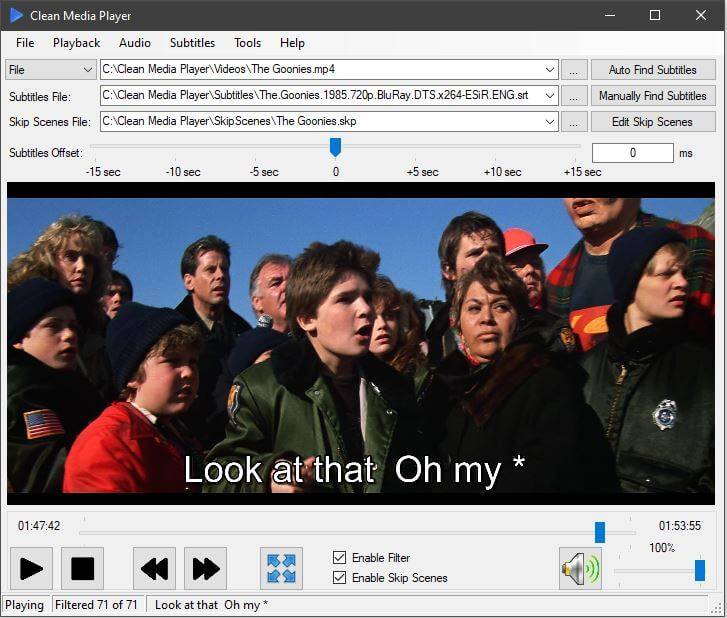
Clean Media Player 是一款专为家庭和成人寻求“净版”观影体验的应用程序,核心功能是自动识别并过滤电影或电视节目中的不雅言语。该应用通过静音处理粗俗用语并显示过滤后的字幕,让用户能干净地欣赏媒体内容。
File Size: 134.5 MB
If you ever found yourself annoyed by profanity in movies, there’s a high chance that you’d wish for a censored version of these. However, until the director decides on releasing it, you’re left with the choice of either muting the unwanted sequences or manually editing subtitles, if you have the option to do that. And even cutting out video bits… Too complicated.
But not if you rely on Clean Media Player. This app, just as its name might suggest, will enable you a far more facile resolution for such issues. It will enable you to apply profanity filter to subtitles, and have the foul bits removed automatically, and even skip scenes, based on timestamps.
Right from the start, I enjoyed the design of Clean Media Player. Not only does it provide an accessible take on adding your video files, but also features decent playback controls and capabilities, and easy toggles for implementing filtering and skip scenes.
One detail worth mentioning is that despite being outside its scope, the app also comes equipped with on-screen controls for setting subtitle offset, both using a slider, as well as manual value input. Nice.
When it comes to the main attraction of the app – namely the profanity removal filter, things are pretty simple and efficient. It comes equipped with an ample, built-in library of words and replacements, which will be automatically included. However, you can also define your own terms, which will be used when generating the final, clean video.
Regarding skipping scenes, you will basically need to set the required timestamps, and the app will automatically remove them for you, and perform the subtitle mods in accordance with the defined filters. Pretty simple and efficient.
Not only does Clean Media Player offer an accessible solution for filtering profanity and foul language in videos, but it also manages to provide efficient ways of automatically censoring subtitles and skipping scenes, leaving you only with the preferred content, in just a few simple clicks.
此处内容需要权限查看
会员免费查看