AccdbMerge是一款专用于对比和合并Microsoft Access数据库(.accdb和.mdb)的实用工具,支持数据表、对象及代码差异对比,助您快速同步数据与结构,提升数据库管理效率。
原始标题:AccdbMerge 1.40.0
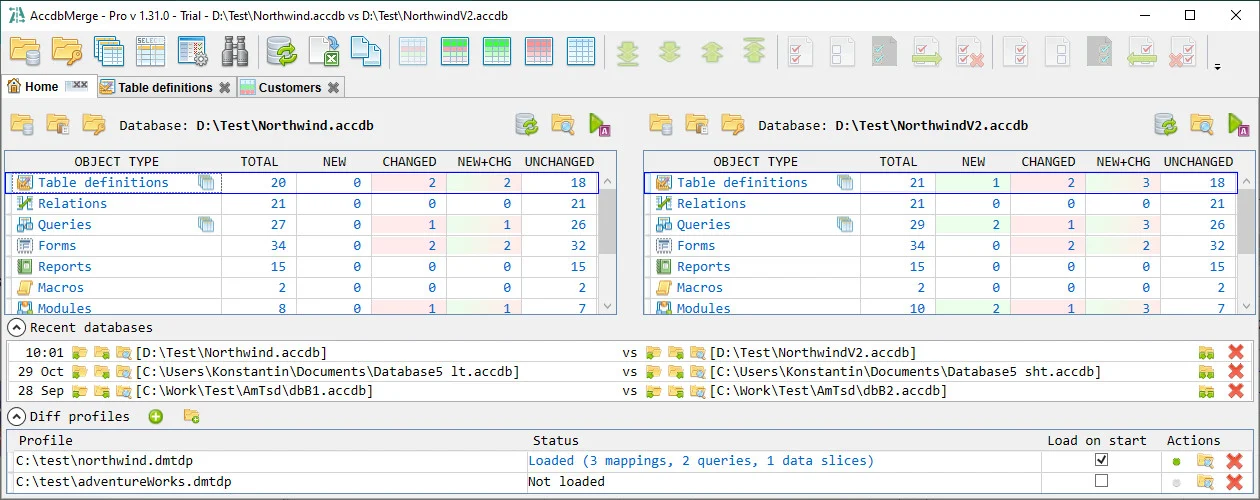
AccdbMerge 是一款专门用于对比和合并 Microsoft Access 数据库文件(.accdb 和 .mdb)的第三方实用工具。它可以帮助开发人员和数据库管理员快速找出两个 Access 数据库之间的差异,并进行数据或结构的同步。
核心功能
- 对比数据表:逐行、逐字段对比两个数据库中相同表格的数据差异(新增、删除或修改的内容)。
- 对比数据库对象:支持对比表结构(Fields)、查询(Queries)、窗体(Forms)、报表(Reports)、宏(Macros)和模块(Modules)。
- 数据合并与同步:允许用户选择特定的记录或差异项,将其从一个数据库合并到另一个数据库中。
- 文本代码对比:内置文本对比模块,可以直观地查看 VBA 模块、窗体代码或 SQL 查询语句的具体改动。
File size: 13.6 MB
AccdbMerge is a reliable program that enables you to quickly join the information and structured from multiple Microsoft Access database files, in two projects. The application can perform advanced data differencing, in order to avoid duplicate entries. Moreover, the program offers support for batch data differential comparison.
AccdbMerge features a user-friendly interface which offers a comprehensive view of the tables and the contained data. You can easily merge two files or compare numerous tables in Batch Data Diff. This function can provide you with additional information, since you can query data.
AccdbMerge can process compiled .MDE and .ACCDE files, aside from the basic .MDB, .ACCDB formats. You can select which objects you wish to include in the differencing process, by checking/unchecking the box next to them. Tables, relations, queries, forms, reports, macros, modules and references can easily be compared, from each database. In the case of .MDE and .ACCDE files, however, the software does not support processing modules, forms and reports.
AccdbMerge features an individual function for comparing queries, which can be accessed from the toolbar at the top of the window. You may easily define the query key fields, in order to identify query rows, as well as new or changed records.
AccdbMerge also allows you to compare and merge indexes or relationships from table structure differencing window. Moreover, it offers support for operations performed via command line arguments. You can open AccdbMerge projects in a differencing viewer mode, which allows you to control system clients.
此处内容需要权限查看
会员免费查看