Lazesoft Recovery Suite 5.3.0.1 Technician Edition 是一款强大的系统恢复工具,可修复启动错误、恢复丢失数据、重置密码及克隆硬盘,支持创建救援光盘,助您轻松解决电脑故障。
原始标题:Lazesoft Recovery Suite 5.3.0.1 Technician Edition
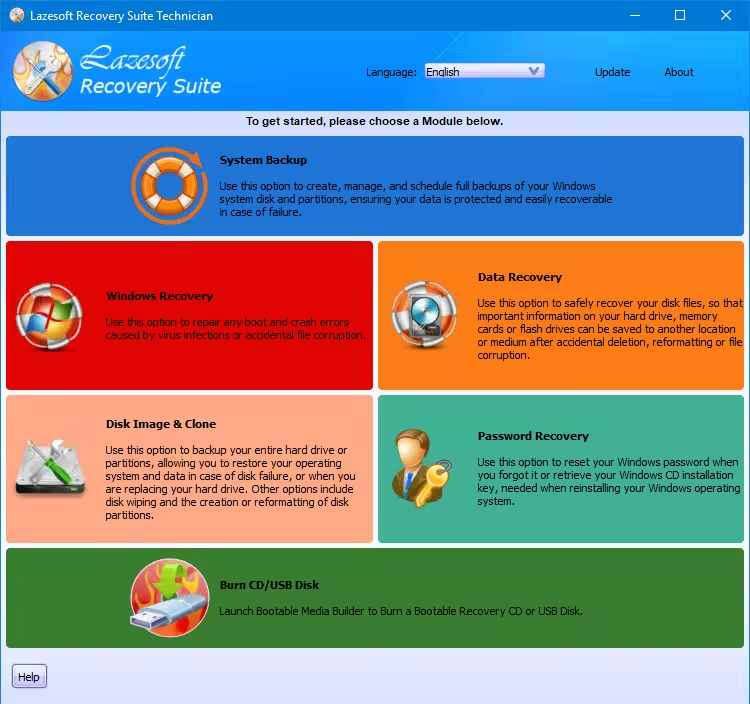
Lazesoft Recovery Suite 可以用于恢复数据、文件或Windows操作系统,或者当您的电脑无法正常启动时,它可以帮助您。可以轻松修复大多数电脑的故障,同时可以快速创建 Lazesoft启动救援光盘或USB,使用这张启动盘可以重新启动您的计算机
Lazesoft Windows系统恢复
修复任何由病毒感染或意外文件损坏引起的引导和崩溃错误。
Lazesoft数据恢复
可以恢复硬盘驱动器、存储卡或闪存中意外删除或格式化或损坏的重要文件
Lazesoft恢复密码
当忘记或丢失了系统密码或域管理员密码,有了它可以恢复; 同时可以恢复系统的安装序列号(重装系统时)
Lazesoft 硬盘镜像&克隆
可以备份或克隆整个硬盘或某个分区,可以将系统还原到备份的状态,即使更换了硬盘驱动器,或进行硬盘擦除、重新格式化分区
File size: 83.2 MB
Lazesoft Data Recovery offers home users and businesses complete solutions to recover deleted files or lost due to the format or corruption of a hard drive, virus or Trojan infection, unexpected system shutdown or software failure. With easy to use interfaces and the most powerful data recovery software engine, you can using Lazesoft Data Recovery recover data by yourself, preview recovered files while the search is in progress.
Comprehensive Recovery Environments and Capabilities
– Supports every brand of server and computer like Dell, HP, IBM, etc
– Comprehensive recovery of environments based upon WinPE and Linux
– Excellent hardware compatibility
– Support any type of hard disks, including RAID, SATA, IDE, SSD and SCSI
– Option to create a WinPE USB boot disk
– Option to create 32-bit or 64-bit Windows PE boot disk
– Create a bootable disk with just a few clicks
– Easy to use bootable interface
– Supports UEFI boot mode and BIOS boot mode (New!)
– Create WinPE 5(Windows 10) x86 boot disk (New!)
– Create WinPE 5(Windows 10) x64 boot disk (New!)
Retrieve your critical data with Lazesoft File Manager
– Access and copy files from computer even if Windows does not start normally.
– Boot from Lazesoft Recovery Suite Recovery CD or USB Disk to copy files to another local disk.
Registry Editor and Registry Recovery
– View and modify settings of any Windows system registry in the offline mode.
– Recover corrupted registry to rrevious normal state
– After recovery, you even have an option to Undo the ‘Registry Recovery’ operation.
Undelete Partition
– Recover partition after accidental deletion or partition table damage
– Preview partition files before saving it.
– Support FAT, NTFS partition.
Powerful Data Recovery Tool
– Recovers deleted files from damaged, formatted, reformatted, or deleted partitions.
– Two types of scan: File Recovery and Partition Recovery
– Partition Recovery supports FAT, FAT32 and NTFS partitions.
– Recover files including documents, photos, video, music and email etc.
– Data Recovery Recognizes Files Based on File Signatures.
– Recover from hard drive, camera card, USB, iPod, iPhone or other media.
– Fully support Mac OS HFS file system data recovery
Partition or disk backup and restore
– Create a fast, complete and compressed disk or partition image
– Create a sector-by-sector, image of your entire disk or selected partitions
– Backup and Restore GPT disk
It can be used with all Windows versions; Win 7/Win 8.1/Win 10/Win 11/Server 2003/Server 2008/Server 2012/Server 2016/Server 2019/Server 2022.
解压密码:recovery
此处内容需要权限查看
会员免费查看