Replacicon 2.1 MacOS 图标管理神器
Replacicon 是一款专为macOS设计的应用图标查找、替换与管理工具,支持一键替换、原图标恢复、自动保持更新,并可利用Apple Intelligence生成图标。让你的Mac界面视觉统一,告别图标混乱。文件大小仅5.6 MB。
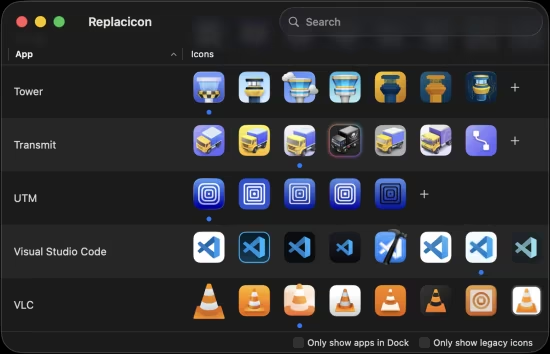
Replacicon 是 macOS 平台上一款专为查找、替换和管理应用图标而设计的实用工具。它不仅能让你的 Mac 界面保持视觉统一,还能解决许多第三方应用在更新后图标还原的痛点。
File Size: 5.6 MB
Replacicon helps customize macOS app icons by scanning installed apps and showing alternative icons from online sources in one place. It supports one-click replacement, original icon restoration, Dock-focused filtering, hidden app cleanup, custom icon imports, automatic preservation across app updates, and Apple Intelligence/Image Playground icon generation on supported systems.
Features
Explore thousands of alternative icons for hundreds of Mac apps from sources like macosicons.com.
Search all installed apps to find the one you want to fix up. Use filters to focus on apps in your Dock.
Restore original icons if you change your mind.
Keep your alternate icons across app updates entirely automatically.
Hide apps and icons you do not want to see to narrow down the list.
Import your own icons from disk and manage them with all the rest.
Replacicon is a native app built just for macOS, and it works great with Intel and Apple Silicon Macs.
Run Replacicon on macOS 13 “Ventura” or newer. macOS 26 “Tahoe” is fully supported.
Replacicon speaks your language, and you can help translate the app on CrowdTranslate.
To support the project, Replacicon is a one time payment. We hate subscriptions as much as you.
System Requirements
• macOS 13 or later
• Apple Silicon or Intel Core processor
此处内容需要权限查看
会员免费查看