TrayStatus Pro 5.2多语言版是一款系统托盘工具,可实时显示Caps Lock、Num Lock等键盘按键状态,并支持CPU、内存性能监控及自定义图标主题,兼容Windows XP至10系统。
原始标题:TrayStatus Pro 5.2 Multilingual
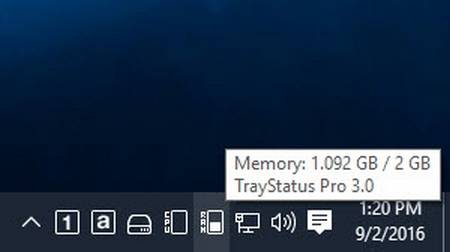
一款可以在右下角托盘处显示你的键盘某些按键当前状态的软件,比如你的number lock键当前是开启还是关闭,大小写的Caps Lock的开启关闭,以及一系列的常用按键的状态。
TrayStatus shows you the status of keyboard keys like Caps Lock, Num Lock, Scroll Lock, Alt, Ctrl, and more, right in your system tray.
Show Key Status
Show the status of the Caps Lock, Num Lock, Scroll Lock, Kana, Alt, Ctrl, Shift and Win keys in your system tray.
Performance Status Indicators
Show CPU, memory, or hard drive activity, or use performance counters to monitor things like disk queue length, network activity, IIS requests and much more.
Notifications
Play a sound or show a tray notification when a key is toggled.
Toggle Keys
Double-click a Status Indicator to toggle that key’s lock status.
Icon Themes
Use the built-in light or dark icon themes, or create your own custom icon themes to suit your style.
Languages
TrayStatus is translated into many different languages for easier use.
OS : Windows 10, 8, 7, Vista and XP (32-bit and 64-bit) / Windows Server 2012, 2008 and 2003 (32-bit and 64-bit)
Language : Multilingual
官方网站:http://www.binaryfortress.com/
此处内容需要权限查看
会员免费查看