
TranscribeKit 1.2.0 是一款高效音视频转录工具,支持多格式导入、自动生成字幕,并可翻译19种语言。本地处理保护隐私,无需订阅,适合创作者、教育工作者等专业人士使用。
原始标题:TranscribeKit 1.2.0
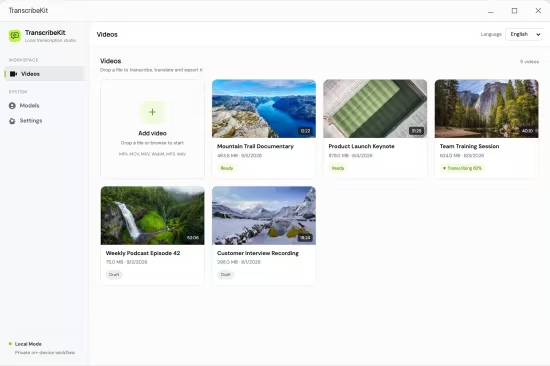
TranscribeKit 是一款强大的音视频转录工具,能将音频和视频文件快速转换为可编辑的文本与字幕。它支持本地桌面端和云端集成工作流,非常适合内容创作者、教育工作者和专业人士使用。
- 音视频转录:支持导入多种格式的媒体文件并自动生成高精度的文字转录本。
- 多语言支持:能够识别并处理多种不同语言的语音内容。
- 本地与便捷工作流:提供专注的桌面端操作体验,也可以通过 Google Workspace 插件直接处理云端文件。
Languages: Multilingual
File Size: 323.25 MB
Your audio. Your machine. Transcribed. Convert any audio or video to accurate, editable subtitles — entirely on your Windows PC. No cloud. No subscription. No account required.
Upload
Drop in any audio or video — MP3, WAV, MP4, MKV, MOV, WEBM, and more.
Transcribe
Runs on your CPU. Auto-detects language. Edit any segment directly in the app.
Export
Export in 5 formats, translate into 19 languages, or burn subtitles into video.
Everything you need to work with spoken content.
A focused toolset for podcasters, researchers, filmmakers, journalists, and educators.
Accurate Transcription
Industry-leading Whisper AI transcribes with professional accuracy across 60+ languages. Voice Activity Detection filters silence for cleaner results.
Editable Segments
Every transcribed segment is editable. Fix words, review timecodes, and search across the full transcript — all within the built-in editor.
AI Translation
Translate transcriptions into 19 languages via OpenRouter. Supports GPT-4o, Claude, Gemini, Llama, and more. Progress-tracked and re-translatable.
Burn Subtitles into Video
Permanently embed subtitles into MP4. Customize font, size, color, and position. Dual-subtitle mode shows original and translation simultaneously.
AI Proofreading
Let AI review and suggest corrections to your transcription. You see every change before it’s applied — nothing is modified without your approval.
100% Private
Transcription runs entirely on your CPU. Your files never leave your machine. No account. No subscription. No data collection.
System Requirements
Windows 10 version 17763.0 or higher
此处内容需要权限查看
会员免费查看


