
本课程专为初中级Flutter开发者设计,通过构建3款高保真项目,深入掌握Flutter内置动画系统,包括Tween补间动画、Animation Controller及Hero共享元素等进阶技巧,助力打造商业级精品应用。
原始标题:Flutter Animation Masterclass : Build Premium Flutter Apps
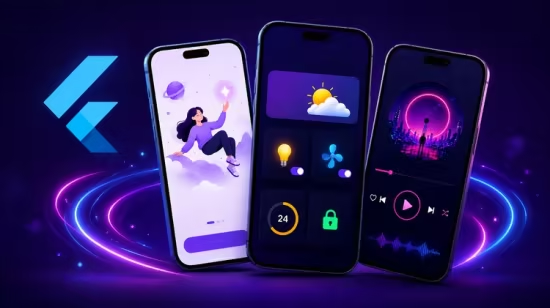
本课程是一门专为初中级 Flutter 开发者打造的纯实战动画进阶课,通过构建引导页、智能家居面板和媒体播放等 3 款完整高保真项目,帮助学员建立复杂的动画开发思维。课程深入剖析 Flutter 内置动画系统,涵盖基础变换以及 Tween 补间动画、Animation Controller 和 Hero 共享元素动画等进阶技巧,助力学员打造商业级精品应用。
Published 8/2026
MP4 | Video: h264, 1920×1080 | Audio: AAC, 44.1 KHz, 2 Ch
Language: English | Duration: 3h 29m | Size: 2.35 GB
Master Flutter Animations by Building 3 Premium Apps Using Flutter’s Built-In Animation System
What you’ll learn
Beginners to intermediate Flutter developers who understand the basics of Flutter and want to build more polished apps
Students who want to improve their Flutter UI/UX skills through hands-on projects
Developers building portfolio projects who want their Flutter applications to look more professional and engaging
Developers who want to learn practical Flutter animations by building real-world projects instead of only studying isolated examples
Flutter developers who want to learn how to create smooth, professional animations in Flutter
Requirements
Basic knowledge of Dart programming is recommended
Basic understanding of Flutter widgets and Flutter app development
Flutter and Dart installed on your computer with a working development environment such as VS Code or Android Studio
No prior experience with Flutter animations is required
You do not need to have built an advanced Flutter application before taking this course
Description
Want to take your Flutter apps from simple and static to smooth, interactive, and professional?
Welcome toFlutter Animation Masterclass – a hands-on course designed to help you master Flutter animations by building3 complete, visually engaging Flutter projects from scratch.
In this course, you won’t just learn animation concepts, you’ll see how to apply them to real app interfaces and understand how different animation techniques can work together to create polished user experiences.
What You’ll Build
Project 1 — Animated Onboarding
Build a beautiful onboarding experience while learning essential Flutter animation techniques such as fade, slide, scale, opacity, position, and animated transitions.
Project 2 — Animated Home Dashboard
Create a modern smart home dashboard with interactive device animations. You’ll work with techniques such as Hero animations, rotation, scaling, Tween animations, animation controllers, and interactive UI elements.
Project 3 — Animated Music Player
Build a premium-looking music player interface with smooth album art and UI transitions. You’ll learn how to combine multiple animation techniques to create a polished and dynamic experience.
What You’ll Learn
Throughout the course, you’ll learn how to
– Understand the fundamentals of animations in Flutter
– Use Flutter’s built-in implicit animation widgets
– Create smooth fade, slide, scale, and position animations
– Use AnimatedSwitcher to create seamless UI transitions
– Implement Hero animations between screens
– Create rotation animations using AnimationController
– Work with AnimationController and TickerProviderStateMixin
– Use Tween animations to create custom transitions
– Combine multiple animations to create premium-looking interfaces
– Add animations to real-world Flutter app designs
– Build reusable animation patterns that you can apply to your own projects
The goal of this course is not simply to teach you how to make things move. You’ll learn how to use animationwith purpose – to improve interactions, guide users, create visual feedback, and make your applications feel more polished.
Whether you’re building a portfolio project, a personal application, or preparing for professional Flutter development, the animation techniques you learn here can be reused across many different types of Flutter applications.
By the end of the course, you’ll have3 complete Flutter animation projects and a stronger understanding of how to bring your Flutter UI designs to life.
So open your code editor, follow along, experiment with the animations, and let’s start building premium Flutter apps!
Who this course is for
Beginner to intermediate Flutter developers who want to learn how to create smooth and professional animations
Flutter developers who know the basics of Flutter but want to take their UI designs to the next level
Students who want to build polished Flutter apps that look modern, interactive, and professional
Anyone who wants to understand Flutter’s animation system and apply it to practical applications
此处内容需要权限查看
会员免费查看


