
本课程专为Blender爱好者与动画师打造,系统讲解手动绑定技术,无需插件。采用四阶段阶梯式教学,前两阶段夯实骨骼基础与核心机制,帮助学员理解绑定原理,独立完成角色动画。
原始标题:The Complete «Manual Rigging in Blender« course (no addons!)
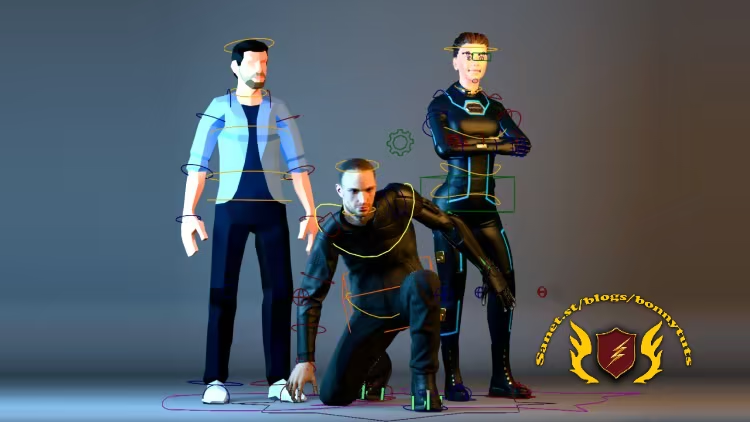
该课程是一门专为Blender爱好者、动画师及跨软件转型绑定师打造的系统化手动绑定实战课程,采用四阶段阶梯式教学,剖析操作原理以帮助初学者建立扎实的底层逻辑。目前释出的前两阶段专注于夯实基础与拓展核心机制,涵盖从骨骼基础到高级运动机制的专项训练,帮助学员快速掌握独立完成角色动画的能力。
Published 9/2026
Created by Todor Nikolov
MP4 | Video: h264, 1920×1080 | Audio: AAC, 44.1 KHz, 2 Ch
Level: Beginner | Genre: eLearning | Language: English | Duration: 65 Lectures ( 16h 11m ) | Size: 14.5 GB
Breath live into your characters!
What you’ll learn
⚡ Learn Manual Rigging in Blender: from Beginner to a comfortable Intermediate Level
⚡ Learn Rigging in a gradual manner, avoiding overwhelm and burn-out
⚡ Learn the “Why” behind rigging so that by the end you understand the principles of rigging, and not just how to rig one specific thing.
⚡ Engage in fun challenges along the way to maximize understanding.
Requirements
❗ Basic understanding of the Blender UI and 3D Navigation
Description
Are you ready to demystify rigging and take your 3D characters to the next level?The Complete “Manual Rigging in Blender” course is designed to guide you through the essentials of manual rigging, step by step.
This course makes rigging approachable, fun, and rewarding. By the end, you’ll have the confidence to create solid rigs and start animating your own characters!
Who is this course for
✨ Blender artists with little or no prior experience in Rigging
✨ Animators who want to understand rigging better.
✨ Maya/3ds max/C4D/etc. Riggers looking to add Blender to their toolkit (or even switch to Blender)
What’s Included
The course is divided into4 progressive levels, ensuring a smooth learning curve as you build your skills
Level 1: Absolute Beginner
Perfect for those with no prior knowledge of rigging, armatures, or bones. In justfive concise lessons, you’ll learn everything you need to rig your first character
✨Bone Basics: From zero to rigging your first character.
✨Core Rigging Mechanism: Discover the one Blender constraint every rigger must know.
✨Weight Painting Made Easy: Learn my tested workflow to improve your rig’s functionality.
✨Blender Animation Basics: Create a simple walk cycle and understand essential animation concepts.
✨Challenge: Rig something new with my guidance!
Level 2: Novice
Build on the basics withkey rigging fundamentals and more advanced mechanisms. This level is the missing section in most rigging training. It keeps the difficulty manageable while introducing you to new concepts
✨Anatomy as a Guide: Place bones accurately using anatomy principles.
✨Understanding Bone Roll: Master this crucial concept, even if it’s stumped advanced users.
✨Mechanisms: Create wrist and shoulder twists, hips and foot setups, and more.
✨Pro-Level Bone Shapes: Make your rigs look polished and professional.
✨Advanced Weight Painting: Explore what happens behind the scenes with Blender’s “Automatic Weights.”
✨Cool Tricks: Learn how to preserve volume, use Blender’s “Magic Modifier,” and grasp Euler and Quaternion basics.
✨Novice Challenge: Rig a character’s face with hands-on support from me!
Level 3: Intermediate
Take on a more advanced rigging project that rivals Blender’s Rigify Human rig. You’ll dive into
✨ Advanced twisting mechanisms.
✨ IK-FK switching.
✨ Limb isolation.
✨ Complex foot setups.
✨ Shapekeys, drivers, and custom properties.
This level builds on the solid foundations of Levels 1 and 2, helping you confidently tackle intermediate rigs. By the end, you’ll have created a shapekey-based face rig and a fully functional, professional-grade character rig.
Level 4: Advanced
Here are the main features you’ll learn to implement in Rigging Unleashed.
✨Full Body Squash and Stretch– enable extreme cartoony deformations for your characters!
✨Soft IK –Soft IK is not easy to demonstrate with a GIF. But you’ll feel it when you animate. Without soft IK, the legs will overextend and “pop” and you’ll have to constantly correct the pose to fix it. Soft IK saves the animator a lot of work.
✨Additional Isolation Mechanisms –more improvements that will pay off by saving you animation time.
✨IK Fingers– for when you want to pin the fingers, rather than the IK hand.
✨Smooth Foot Roll – fora more natural foot lift
✨FACE: sticky controls –the shapekey controls follow the mesh exactly for intuitive face manipulation
✨FACE: Sticky Lips –more realistic lips behavior
✨FACE: Wrinkle Maps –make your character’s face even more expressive
—
If you’ve ever thought, “Rigging looks too complicated,” this course will show you thatrigging isn’t scary—it’s exciting!
Who this course is for
⭐ Blender users who want to make their characters come to live
⭐ People who have failed to learn rigging in the past (the course is carefully designed to not get overwhelming)
⭐ Maya, 3ds max and Cinema 4D riggers and animators who want to transition to Blender
此处内容需要权限查看
会员免费查看


