学习用Unity 6与Blender构建完整的工厂自动化游戏。涵盖C#编程、3D资产建模、模块化架构、存档系统及发布流程,适合零基础学员快速掌握商业级游戏开发管线。
原始标题:The Ultimate UNITY 3D & BLENDER Factory Game Course || 2026
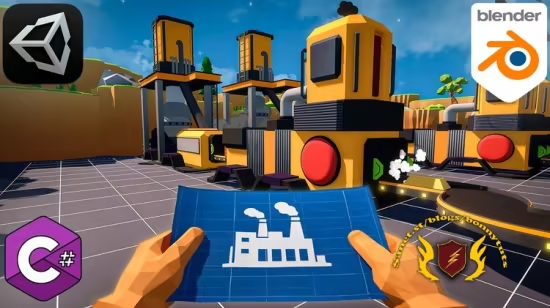
本课程以Unity 6与Blender双轨制为核心,致力于打造从资产建模到游戏发布的工厂自动化游戏全流程教学,涵盖Blender 3D资产制作、Unity 6 C#编程、模块化架构设计及关键工程模式应用。学员通过实战将掌握核心玩法逻辑与商业级生产管线,最终完成模拟游戏打包。更多课程信息,请参阅课程官方平台。
Published 7/2026
Created by Model Craft
MP4 | Video: h264, 1920×1080 | Audio: AAC, 44.1 KHz, 2 Ch
Level: Beginner | Genre: eLearning | Language: English | Duration: 99 Lectures ( 18h 8m ) | Size: 16 GB
Learn Unity 6 and Blender by building a complete Factory Automation Game with C#, UI, Save System, and Production Logic.
What you’ll learn
⚡ Build a complete factory automation game using Unity 6 and C#
⚡ Model, texture, and optimize game assets in Blender
⚡ Create a flexible grid-based building system with removal mechanics
⚡ Develop conveyor belts, production buildings, splitters, mergers, warehouses
⚡ Save/Load functionality, UI systems, sound effects, particle effects, animations
⚡ Why you should use Scriptable Objects, Inheritance, Interfaces, Manager Systems
⚡ Export your finished game ready to share or expand with your own features
Requirements
❗ No previous experience with Unity or Blender is required. Every system is explained step by step from the very beginning
❗ A computer capable of running Unity 6 and Blender
❗ Basic computer knowledge, such as creating folders, installing software, and navigating Windows or macOS
❗ A willingness to learn by building a real project from start to finish
Description
In this course, you’ll build Factory Game while learning professional game development techniques used in real Unity projects.
This isn’t just a programming course. You’ll follow the entire development pipeline—from creating 3D assets in Blender to programming gameplay systems in Unity 6 with C#.
We’ll begin by modeling and texturing every major asset used in the game, includingdrill rigs, conveyor belts, smelters, constructors, warehouses, splitters, mergers, and more. You’ll learn how to create clean, game-ready models and prepare them for Unity.
Once the assets are finished, we’ll move into Unity 6 and build the complete game step by step.Every system is 100% explained, making this course suitable for beginners while still covering techniques used in professional projects.
Throughout the course, you’ll build
✨A complete grid-based building system
✨Automatic conveyor belt connections
✨Mining and resource collection systems
✨Smelters, constructors, warehouses, splitters, and mergers
✨Flexible production and recipe systems
✨Inventory and warehouse management
✨Save & Load functionality using JSON
✨Main menu and pause menu
✨User interface systems
✨Sound effects and 3D audio
✨Particle effects and animations
✨Post-processing with Global Volume
✨Final game build and export
You’ll also learn how to organize large Unity projects using clean architecture and best practices, including
✨Object-Oriented Programming (OOP)
✨Scriptable Objects
✨Singleton Pattern
✨Interfaces and Inheritance
✨Manager-based Architecture
✨Modular Game Systems
One of the biggest advantages of this course is that every feature is built from scratch. Instead of copying isolated examples, you’ll understand how complete gameplay systems are designed and how they work together in a real project.
Not interested in Blender? No problem! All models and textures created during the modeling section are included with the course, so you can skip directly to the Unity programming lessons whenever you want.
By the end of this course, you’ll have a fully playable factory automation game featuring dozens of interconnected systems and a solid understanding of how to design, build, optimize, and polish a complete Unity project.
Whether you’re an aspiring indie developer, a Unity beginner, or someone looking to improve your programming and game architecture skills, this course will give you practical experience by building a real project from start to finish.
If you’re ready to create your own factory automation game and significantly improve your Unity and Blender skills, I’ll see you in the first lesson.
Who this course is for
⭐ Beginners who want to learn Unity by creating a complete game instead of isolated examples
⭐ Developers interested in factory automation games such as Satisfactory, Factorio, or Shapez
⭐ Students who want to learn both Blender and Unity within a single practical project
⭐ Unity developers looking to improve their understanding of project architecture, production systems, and gameplay programming
⭐ Anyone who wants to build a portfolio project demonstrating 3D modeling, gameplay programming, UI, save systems, optimization, and game architecture
⭐ Hobbyists and indie developers who want a solid foundation for creating their own simulation or automation games
此处内容需要权限查看
会员免费查看