
CleanFrame是一款Windows桌面照片去杂物工具,采用非破坏性编辑,软画笔涂抹即可智能重建背景,支持离线处理,保护隐私。
原始标题:CleanFrame 1.1.0
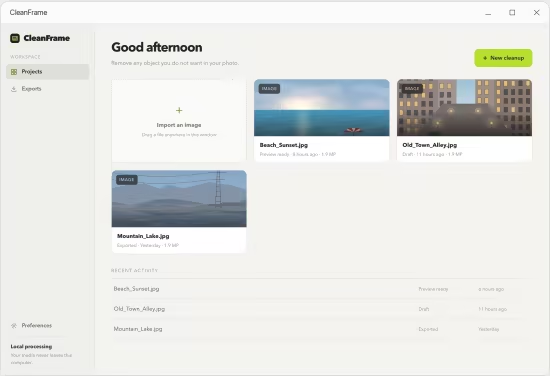
CleanFrame 是一款专为 Windows 用户设计的桌面照片去杂物工具。它采用非破坏性编辑机制,让用户只需通过软画笔涂抹即可智能消除照片中不想要的物体,并基于周边纹理、色彩与结构完美重建天空或墙面等背景,同时保证未涂抹区域的高分辨率画质不受丝毫损伤。该软件提供快速、自然和细节三档处理级别,并支持实时拖动滑块进行全分辨率的前后效果对比;最核心的是,它支持完全离线运行,所有图片处理均在用户本地电脑完成、绝不上传云端,完美兼顾了操作的简便性与极高的个人隐私安全。
Languages: Multilingual
File Size: 304.76 MB
Remove anything you don’t want from your photos. Brush over the object. CleanFrame rebuilds the background behind it, so the result looks like the thing was never in the picture. Every photo stays on your own computer.
What it does
A single job, done properly: take the object out and make the gap look like it belongs.
Paint it out
A soft brush marks whatever should go. Resize it for fine edges or broad sweeps, erase to correct the mask, and mark several objects at once.
Background rebuilt
The covered area is filled using the texture, colour and structure around it, so skies stay smooth, walls stay flat and grass still looks like grass.
Compare before saving
A draggable split slider puts the original and the result side by side at full resolution, so you can judge the work before you commit to it.
Detail is kept
Only the area you painted is processed, at close to its original resolution. Everything else in the photo is left untouched, at any image size.
Your speed, your quality
Three fill levels. Fast for a quick look, Natural for everyday work, and Detail for large removals with complicated surroundings.
Export where you like
Save as PNG, JPG or WebP into any folder. Your original file is never modified — the result is always written as a new file.
System Requirements
Windows 10 version 17763.0 or higher
What languages does it support?
English, Simplified Chinese, Traditional Chinese, Japanese, Korean, French, German, Spanish and Italian. On first launch it follows your Windows language, and you can change it at any time in Preferences.
此处内容需要权限查看
会员免费查看


