
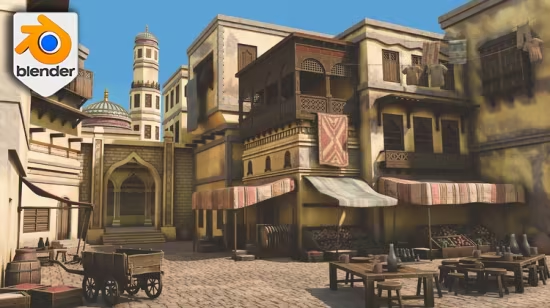
Blender风格化阿拉伯市场场景制作教程
学习在Blender中创建完整的风格化阿拉伯市场3D场景,涵盖建筑、道具、材质、UV工作流与PBR贴图,适合环境艺术学习者。
Published 5/2026
MP4 | Video: h264, 1920×1080 | Audio: AAC, 44.1 KHz, 2 Ch
Language: English | Duration: 9h 16m | Size: 15.85 GB
Create a complete stylized Arabian market in Blender with architecture, props, materials, trim sheets, texture atlases,
What you’ll learn
● Navigate Blender and use the core modelling tools needed for environment creation.
● Set up references, resources, scale guides, and a clean Blender workspace.
● Build a strong blockout using simple shapes, proportion, and camera planning.
● Model Arabian-inspired architecture such as arches, domes, towers, doors, windows, balconies, pillars, trims, and decorative wooden details.
● Use bevels, booleans, arrays, mirror, solidify, and subdivision surface modifiers in practical scene-building situations.
● Create market props including crates, barrels, clay pots, plates, rugs, tables, chairs, clothes rails, cloth piles, food displays, and a wheelbarrow.
● Apply PBR materials, trim sheets, texture atlases, UV workflows, normal maps, and vertex paint for stylized variation.
● Use provided resources without losing sight of how the scene is built.
● Dress a market environment with layered detail so it feels busy, readable, and lived in.
● Set up Cycles lighting, sky background, atmosphere, displacement, camera framing, and final render settings.
Requirements
● You should have access to Blender 5 or Blender 5.1.
● A computer capable of running Blender and rendering with Cycles is recommended.
● The included course resources are used during the workflow and should be extracted before opening the Blender files.
Description
Your Blender scenes do not need to stay trapped in the “nice props, empty world” stage. This Udemy course shows you how to build a complete stylized Arabian market environment from simple blockout shapes into a finished 3D scene packed with warm architecture, market props, fabric, materials, lighting, and final render polish.
If you have ever built a few decent-looking assets in Blender and then wondered why the full environment still feels flat, empty, or suspiciously cube-shaped, this project is designed to make the full workflow click.
You will start with the essentials: navigation, transforms, edit mode tools, snapping, bevels, arrays, booleans, and clean modelling habits. From there, you will build Arabian-inspired architecture including arches, domes, towers, balconies, trims, pillars, doors, windows, wooden details, and decorative features.
Once the buildings are in place, you will bring the market to life with props and set dressing: crates, barrels, pots, plates, carpets, rugs, food displays, clothes rails, chairs, tables, fabric piles, canopy pieces, and a detailed wheelbarrow. You will then work with PBR materials, texture atlases, trim sheets, vertex paint, UV workflows, and final Cycles lighting to create a warm stylized render.
This is not a loose collection of random modelling exercises. Every lesson contributes to the same finished marketplace scene, so you can see how a real environment workflow develops from blockout to final presentation.
此处内容需要权限查看
会员免费查看


